
Lenovo IdeaPad 5a 2-in-1 review: A good laptop with a slow CPU
Table of Contents
At a glance
Expert’s Rating
Pros
- Spacious keyboard with numpad and good key feel
- Two-watt speaker system provides loud, clear audio
- Good range of USB-C and USB-A connectivity
- 1080p webcam with privacy shutter and Windows Hello support
Cons
- Build quality is mediocre, even for a budget laptop
- Small touchpad with disappointing physical click action
- AMD Ryzen AI 5 430 only offers 4 cores
- Weak integrated graphics
Our Verdict
The Lenovo IdeaPad 5a is a budget Windows 2-in-1 that offers a comfortable keyboard and lots of connectivity. However, AMD’s quad-core Ryzen AI 5 430 doesn’t offer great performance, even for an entry-level 2-in-1.
Price When Reviewed
This value will show the geolocated pricing text for product undefined
Best Pricing Today
Price When Reviewed
$899.99
Best Prices Today: Lenovo IdeaPad 5a 2-in-1
One trend that leapt out to me at CES 2026 was that Intel seemed to dominate product announcements. Yes, there were some AMD and Qualcomm-powered machines on the show floor, but time and time again Intel was given preference.
Lenovo’s IdeaPad 5a 2-in-1 provides a possible reason why that happened. The 2-in-1 itself is a fine (though not remarkable) entry into the sub-$1,000 2-in-1 arena, but AMD’s “new” Ryzen AI 5 430 fails to deliver strong results in CPU, GPU, or battery life tests.
The Lenovo IdeaPad 5a 2-in-1 is a device that finds itself carrying the weight of the world on its shoulders.
Lenovo IdeaPad 5a 2-in-1: Specs and features as-tested
The Lenovo IdeaPad 5a is a budget Windows 11 2-in-1, so it’s equipped with entry-level hardware. That includes AMD’s Ryzen AI 5 430, which has just four CPU cores and eight threads. Graphics performance comes courtesy of Radeon 840M integrated graphics. The system also has 16GB of RAM and a 512GB solid state drive.
- CPU: AMD Ryzen AI 5 430
- Memory: 16GB DDR5-5600
- Graphics/GPU: Integrated AMD Radeon 840M
- NPU: AMD XDNA NPU up to 50 TOPS
- Display: 15.3-inch 1920×1200 60Hz IPS touchscreen
- Storage: 512GB PCIe 4.0 SSD
- Webcam and microphone: 1080p webcam with IR camera and privacy shutter, dual microphone array
- Connectivity: 2x USB-C with 10Gbps data, DisplayPort Alternate Mode, up to 65 watts of Power Delivery, 2x USB-A with 5Gbps data, 1x HDMI 2.1 up to 4K/60Hz, 1x 3.5mm headphone jack, 1x microSD card reader
- Networking: Wi-Fi 7, Bluetooth 5.4
- Biometrics: Windows Hello facial recognition
- Battery capacity: 60 watt-hours with rapid charge (up to 2 hours runtime in 15 minute charge)
- Dimensions: 13.39 x 9.53 x 0.69 inches
- Weight: 3.9 pounds
- Operating System: Windows 11 Home
- Other features: Optional Lenovo Pen Gen 2
- Price: $899.99 MSRP
The configuration I tested is the entry-level model with an MSRP of $899.99. Lenovo does offer a few configuration options including an upgrade to the AMD Ryzen AI 7 445, which nets you two more CPU cores but unfortunately doesn’t upgrade the integrated graphics.
You can also snag a 1TB SSD, swap in a 2560×1600 OLED display, and upgrade to 32GB of memory. Most of these upgrades are affordable (under $100) except for the RAM. Upgrading from 16GB to 32GB will currently set you back $220.
Lenovo IdeaPad 5a 2-in-1: Design and build quality
Foundry / Matthew Smith
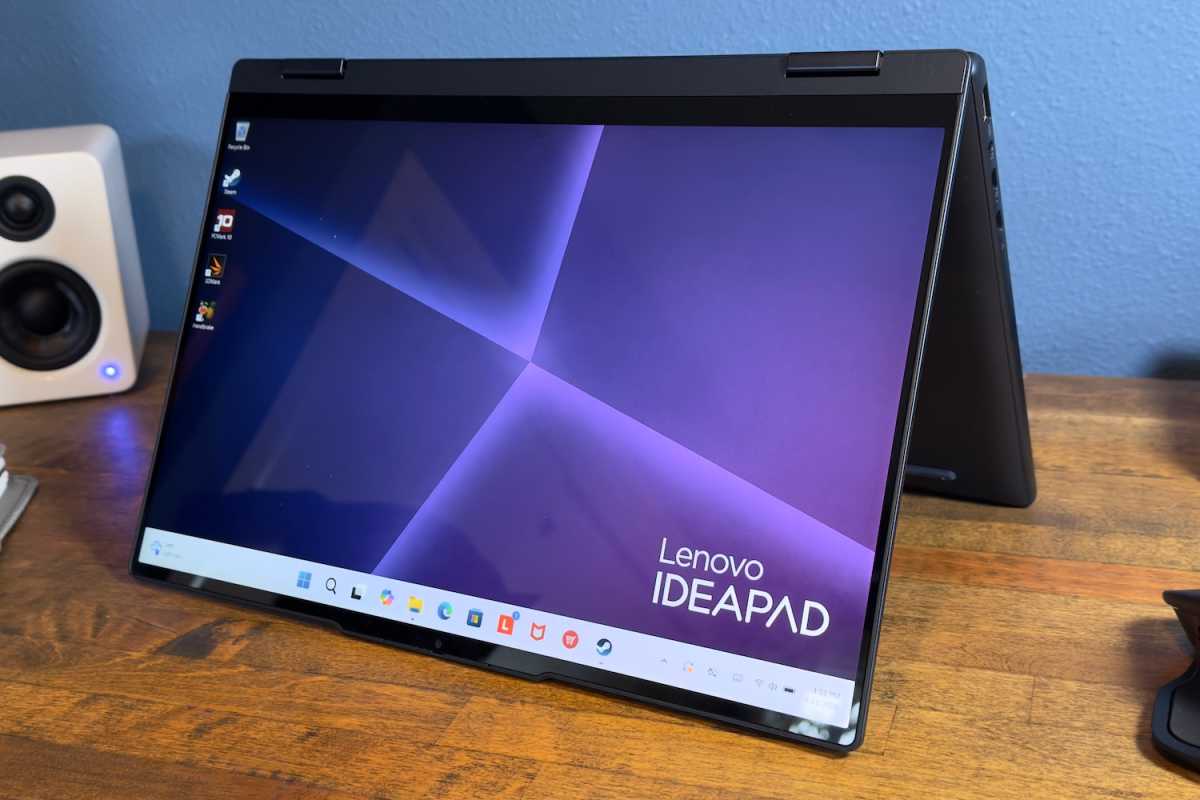
The Lenovo IdeaPad 5a 2-in-1’s budget price point is made clear by its design. It pairs an aluminum display lid with a chassis that’s otherwise plastic, and the difference between the two surfaces is obvious. The aluminum lid has an attractive luster that the plastic chassis tries and fails to emulate.
Build quality is acceptable. Opening and closing the display lid reveals a bit of flex, but nothing that’s worrying. The plastic lower half, however, allows enough flex that it’s noticeable when handling the laptop. Picking up the laptop from a corner or edge results in a quiet but audible creak as the plastics flex.
The IdeaPad 5a is a 2-in-1, which means it can be converted into a tablet. That’s achieved with a 360-degree hinge. You can push the display back until it touches the underside of the laptop, turning the device into a tablet.
As you might expect, though, the laptop’s 15.3-inch display makes for a bulky tablet. The IdeaPad 5a also weighs in at almost four pounds, which is fine for a 15-inch laptop, but heavy for a tablet.
The laptop doesn’t ship with a pen by default, though you can add one for just $10, and my review unit had it in the box. I like the pen’s design, as it’s close in size to a real pen and uses a rounded design that didn’t dig into my hand. It attaches magnetically to the rear of the IdeaPad 5a 2-in-1 and also has two physical buttons that can be used to trigger shortcuts. A USB-C port on the pen can be used to charge it.
The tablet mode is ultimately of limited use. It’s acceptable when propped up, but tiring if you need to hold it for more than a few minutes. Fortunately, you can use the keyboard like a kickstand—a use case often called “tent mode.” This is handy for watching YouTube or Netflix.
Lenovo IdeaPad 5a 2-in-1: Keyboard, touchpad
Foundry / Matthew Smith
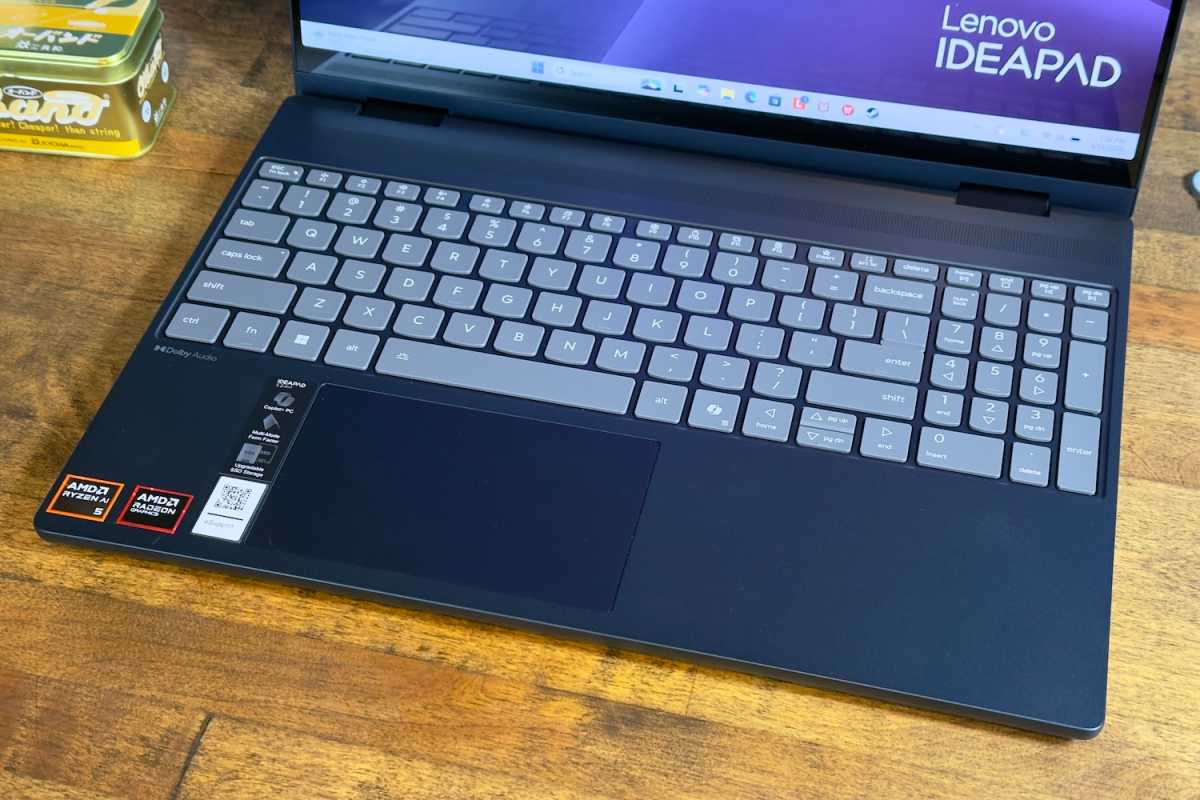
The budget-friendly IdeaPad 5a 2-in-1 offers a spacious keyboard layout with an included numpad. Personally, I prefer 15-inch laptops and 2-in-1s without a numpad, but it’s handy if you need it. Key travel is long and keys activate with a crisp, taut bottoming action. A white LED keyboard backlight is standard.
I do have a couple of nitpicks. The plastic chassis is flexible, and that flex can be felt if you go ham on the keyboard. There’s also not a lot of palm space, an issue caused by the speakers, which are mounted above the keyboard. Still, I enjoyed the typing experience overall.
The touchpad is disappointing. It measures just under five inches wide and three inches deep, which is small for a touchpad on a 15-inch laptop or 2-in-1. The touchpad has a physical mouse button action, but I didn’t like it. The action feels hollow and fragile.
Lenovo IdeaPad 5a 2-in-1: Display, audio
Foundry / Matthew Smith
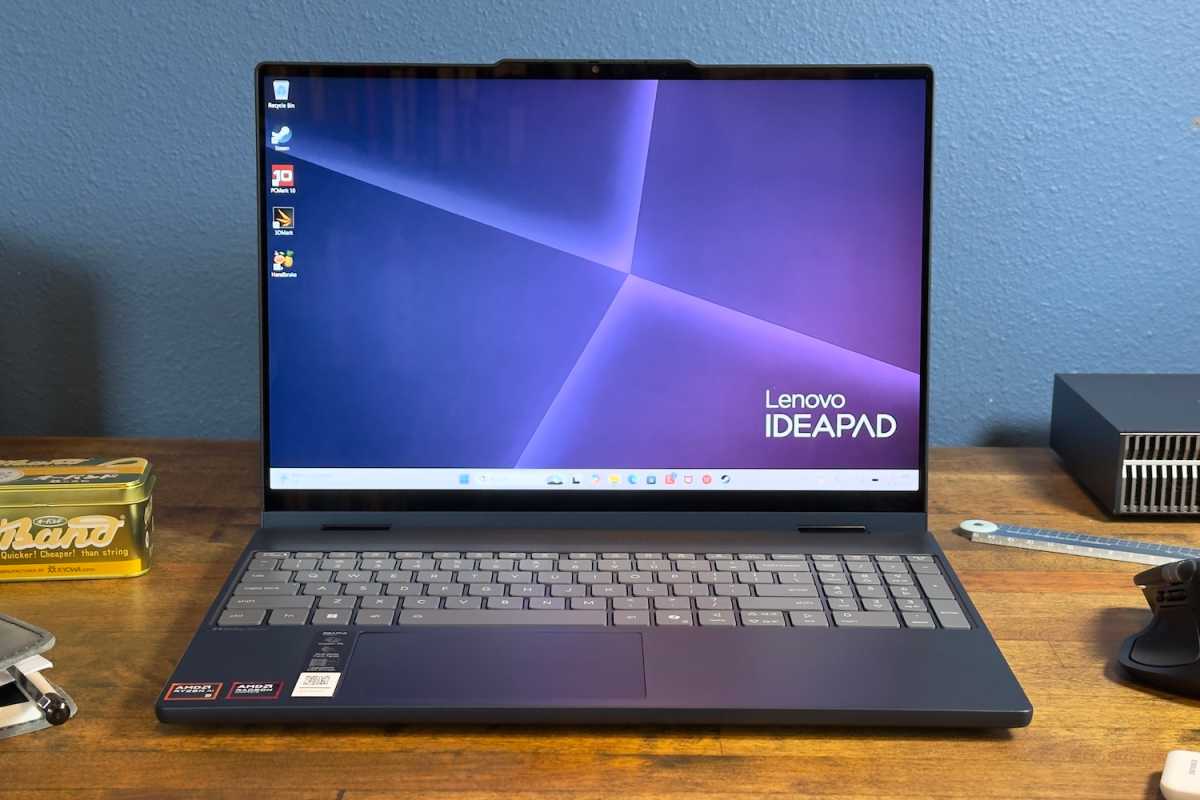
Lenovo ships the IdeaPad 5a 2-in-1 with a 1920×1200 IPS touchscreen. It hits about 400 nits of brightness and provides a refresh rate of 60Hz.
The touchscreen’s image quality is fine but not impressive. Content looks bright and saturated at higher levels of display brightness, but nowhere near as vivid as an OLED display. Contrast is an issue in darker environments as the IPS display’s backlight glow causes scenes that should be dark to look a bit foggy and gray.
To be fair, the IdeaPad 5a is a budget 2-in-1, and it’s not unusual to see this sort of display in a sub-$1,000 laptop or 2-in-1. However, I encourage shoppers to spring for the optional OLED display, which is a $70 upgrade. It increases the resolution to 2560×1600 and the refresh rate to 165Hz. It adds HDR, too.
Audio quality is in the IdeaPad 5a’s favor. It ships with a pair of two-watt speakers mounted above the keyboard. They’re louder than I expected and provide good audio quality in most situations, though they can become muddy if you try to listen to bass-heavy music at full volume.
The position of the speakers is great for laptop use but less so for tablet mode. The speakers will be facing away from you in tablet mode, which lowers the perceived volume. It’s also easy to cover the speakers when using the device as a tablet.
Lenovo IdeaPad 5a 2-in-1: Webcam, microphone, biometrics
Lenovo ships every IdeaPad 5a 2-in-1 with a 1080p webcam and a dual microphone array. The webcam provides crisp video and the microphone picks up clear audio. Windows 11 Studio Effects are supported, so you can easily add noise cancellation or portrait blur independent of the video conferencing software you’re using.
The webcam also has a physical privacy shutter and an IR camera with support for Windows Hello login via facial recognition. Both features are nice to see on a budget 2-in-1, as many competitors omit them.
Lenovo IdeaPad 5a 2-in-1: Connectivity
The IdeaPad 5a 2-in-1 provides good connectivity for a budget Windows laptops or 2-in-1s, and USB-C is the star of the show.
Lenovo includes two USB-C ports with 10Gbps of data, DisplayPort Alternate Mode, and up to 65 watts of power delivery. That makes the ports versatile. You can use them to connect to a USB-C monitor, to power the laptop, or to connect with a wide variety of peripherals.
These are paired with two USB-A ports, each with 5Gbps of data. There’s also an HDMI 2.1 port (though it only supports 4K up to 60Hz), a microSD card reader, and a 3.5mm headphone jack.
While its USB-C connectivity is solid, the laptop lacks any high-speed connectivity like USB-4 with 40Gbps or Thunderbolt. That is common in this price range but worth knowing.
Wireless connectivity is great with support for Wi-Fi 7 and Bluetooth 5.4. This is notable. While Wi-Fi 7 support is fairly common, some laptops still stick to Wi-Fi 6E; the Lenovo ThinkPad X13 Gen 6 and Geekom Geekbook X16 Pro are recent examples.
Lenovo IdeaPad 5a 2-in-1: Performance
The Lenovo IdeaPad 5a 2-in-1 that I tested came equipped with AMD’s Ryzen AI 5 430, an entry-level AMD chip with four CPU cores (and eight threads). It also has AMD’s Radeon 840 graphics and an NPU with up to 50 TOPS of AI performance. This is an entry-level chip, and it delivered entry-level performance in benchmarks.
Foundry / Matthew Smith
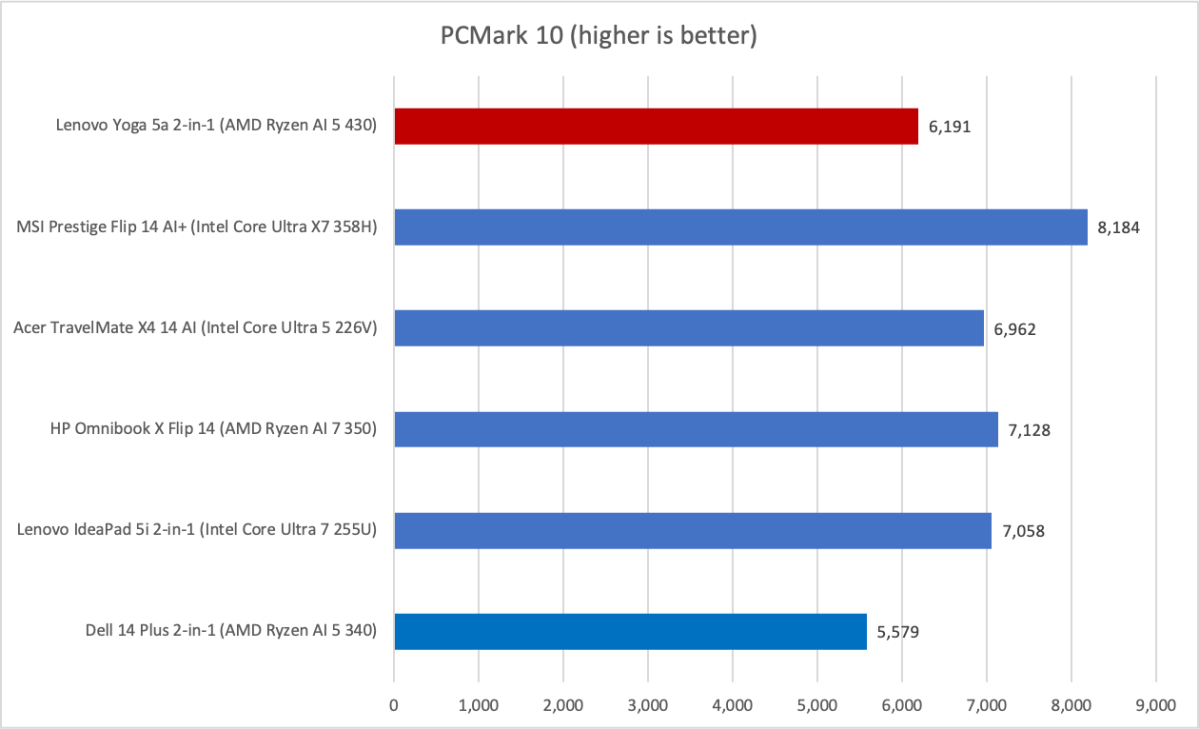
We start off with PCMark 10, a holistic system benchmark. Unfortunately, this proves tough for the Lenovo IdeaPad 5a 2-in-1 with AMD Ryzen AI 5 430. It delivered a score of 6,191, which is towards the lower end of what modern laptops score in this benchmark.
Foundry / Matthew Smith
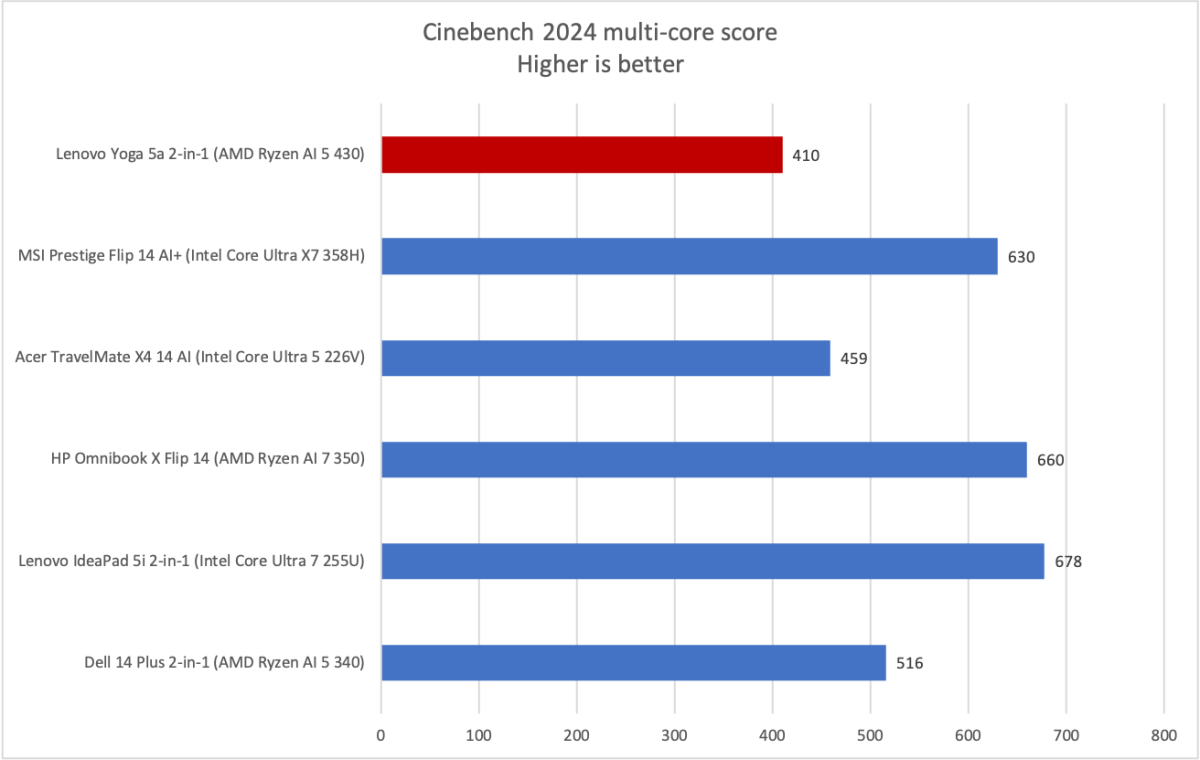
Next up is Cinebench 2024 and, well, there’s no way to sugar coat this. The Lenovo IdeaPad 5a 2-in-1 with AMD Ryzen AI 5 430 struggles. With just four processor cores (and eight threads), the chip lacks the multi-threaded CPU grunt this benchmark requires.
Foundry / Matthew Smith
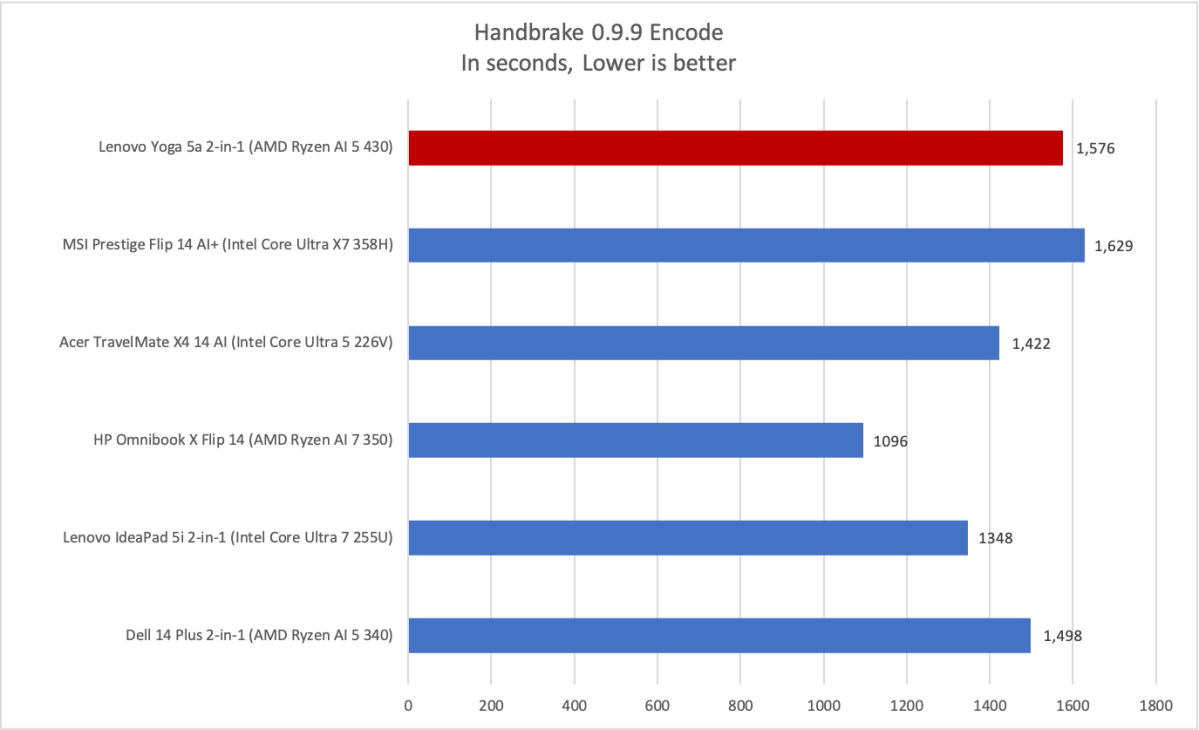
Handbrake tells a similar story, though here the Lenovo IdeaPad 5a 2-in-1 is a bit more competitive, as it’s often only slightly behind other devices with similar hardware. Still, it’s quite disappointing to see the AMD Ryzen AI 5 430 fall behind last year’s AMD Ryzen AI 5 340 and Intel Core Ultra 5 226V, neither of which are screaming fast to begin with.
Foundry / Matthew Smith
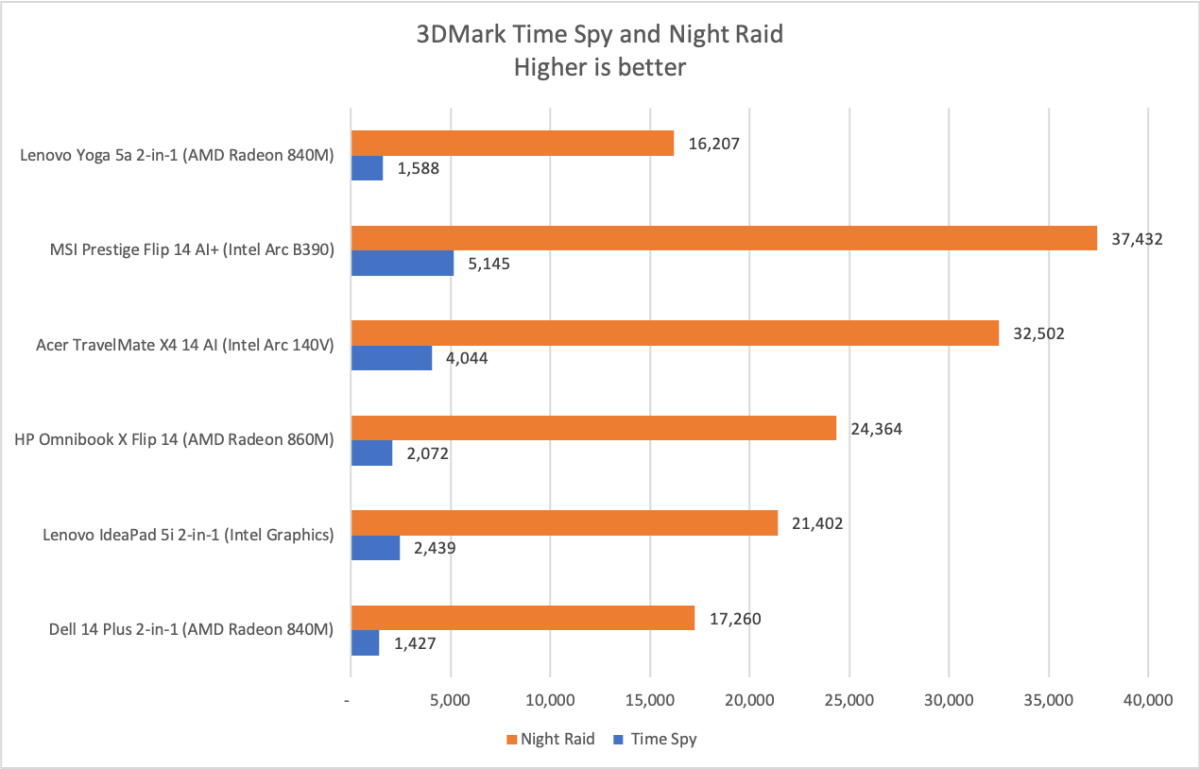
Now we move on to 3D graphics, where the AMD Ryzen AI 5 430 continues to struggle. It has AMD Radeon 840M graphics, and despite the clout of the Radeon brand name, it’s a weak integrated GPU. It has only four CUs, far fewer than the Radeon 880M (which has 12 CUs) and the 890M (which has 16 CUs).
As a result, the Radeon 840M’s performance can’t even compare to older Intel chips with baseline Intel Graphics. More modern Intel Arc graphics leave it in the dust.
Of course, the price remains a factor. It might seem unfair to compare an AMD Ryzen AI 5 430 with laptops that have older but quicker Intel and AMD hardware.
However, the current market makes this comparison valid. There’s a ton of older hardware still on the market, often at discounts that make them competitive against new laptops and 2-in-1s. That will change as older hardware inventory is sold, but at the moment it’s difficult for a new budget Windows laptop or 2-in-1 with the AMD Ryzen AI 5 430 to make a case for itself based on performance.
This kind of situation often occurs when new hardware is released, but it’s amplified in 2026 due to price increases in RAM and storage, as well as AMD’s very minimal upgrades in its new Ryzen AI 400 series mobile processors.
Lenovo IdeaPad 5a 2-in-1: Battery life and portability
Lenovo ships the IdeaPad 5a 2-in-1 with a 60 watt-hour battery. That’s a modest battery for a 15-inch laptop or 2-in-1 (though I wouldn’t call it small), and it ends up delivering mediocre battery life.
Foundry / Matthew Smith
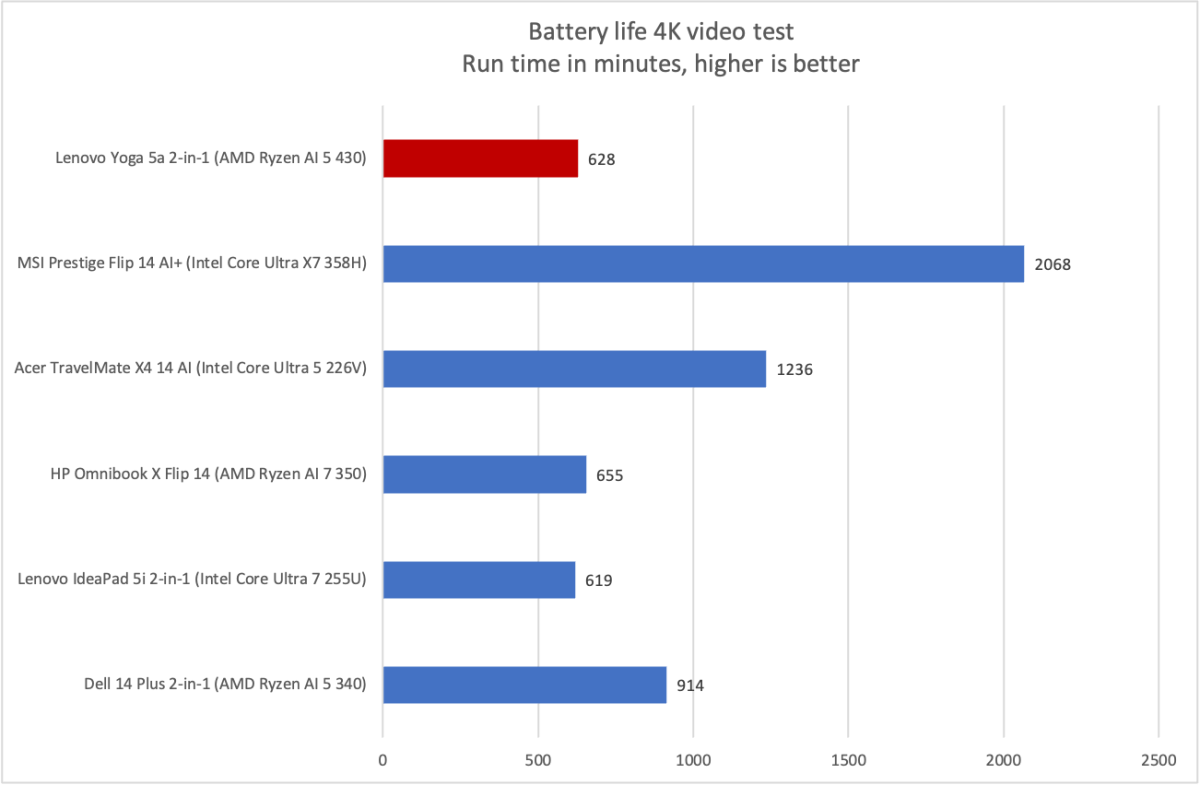
The IdeaPad 5a 2-in-1 endured about 10 hours and 30 minutes in PC World’s standard battery test, which loops a 4K file of the short film Tears of Steel. As the graph shows, battery life can vary a lot in this test depending on the laptop or 2-in-1 in question, and the IdeaPad 5a 2-in-1 is towards the bottom of the pack.
Still, over 10 hours of battery life isn’t bad, and real-world battery life seemed close to that number. That may be a way in which the laptop’s modest performance is a blessing. There’s no power-hungry CPU or GPU that may accidentally suck down 25 percent of your charge because some background process was whirring away without your knowledge.
Charging the IdeaPad 5a is easy thanks to the two USB-C ports with Power Delivery and the Rapid Charge feature. The included power brick is small, making it easy to pack. The laptop’s low power requirements also make it great for use with a multi-port travel charger that can provide up to 65 watts.
Lenovo IdeaPad 5a 2-in-1: Conclusion
The Lenovo IdeaPad 5a 2-in-1 is a device that finds itself carrying the weight of the world on its shoulders. It’s in many ways a respectable budget machine. It’s thin and light for a budget Windows 2-in-1, it has plenty of connectivity, and the keyboard is enjoyable.
However, price increases to RAM and solid state storage force the IdeaPad 5a 2-in-1 to enter the market at $899.99 with an entry-level AMD Ryzen AI 5 430 chip that has just four CPU cores and unimpressive integrated graphics. That makes it difficult to recommend the IdeaPad 5a even at a sub-$1,000 price tag.
