
Lenovo IdeaPad Slim 3i review: An underwhelming $899 laptop
Table of Contents
At a glance
Expert’s Rating
Pros
- Adequate battery life and solid rapid-charge feature
- Good office performer
- XeSS frame-gen enables light gaming for supported games
Cons
- Plastic chassis feels a bit cheap
- More expensive and more poorly configured than the comparable IdeaPad Slim 5x
- Mediocre performance
- Unnecessary barrel charger
Our Verdict
Lenovo’s budget IdeaPad Slim 3i doesn’t quite offer as much as competing devices or even competing IdeaPads, though there’s noting inherently wrong with it.
Price When Reviewed
This value will show the geolocated pricing text for product undefined
Best Pricing Today
Best Prices Today: Lenovo IdeaPad Slim 3i (15-inch), 2026

$1099.99
Budget PCs like Lenovo’s IdeaPad Slim 3i face some tough questions in 2026. Like, why should laptop buyers invest in a new PC right now? Especially given the astronomical component prices. Should buyers invest in a new budget processor like Intel’s Wildcat Lake? This review answers no, with a quiet shake of the head.
I don’t dislike Lenovo’s 15-inch IdeaPad Slim 3i, which boasts a brand-new Intel Core Series 3 chip. This “Wildcat Lake” chip is a stripped-down version of Intel’s superb Panther Lake processor, and it sort of feels like it is right out of the box. I don’t mind budget PCs at all, nor some smart shortcuts here and there. But the performance is blah, and a recent Snapdragon version of this IdeaPad laptop seems to offer more for the money.
Also, there’s another factor. In recent years, I’d never advise you to consider a used PC. In 2026, the norms have changed, and Lenovo’s one-year warranty on parts and labor might not be enough to offset a considerably cheaper, older PC. Keep that in the back of your mind as you read this review, especially as I compare this budget PC to older, “pricier” PCs which have been on the market for a few months.
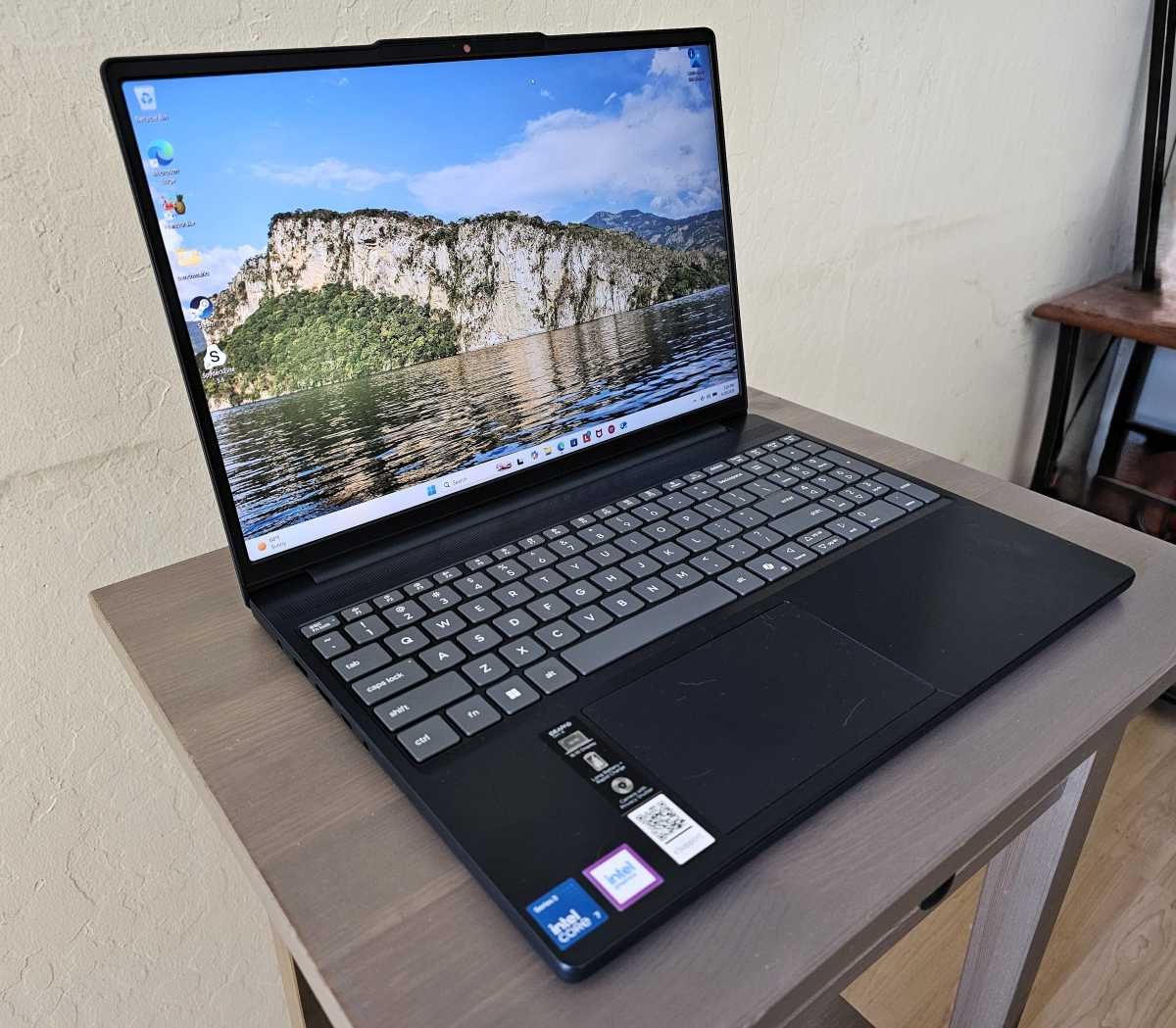
Mark Hachman / Foundry
Lenovo IdeaPad Slim 3i: Specifications
Lenovo quoted us a price of $899 for the below configuration, but the company appears to be selling it at Best Buy for $1,099. At press time, that was the only site we could find this laptop on, including Lenovo’s own. Lenovo’s PR department let us know that the price should change to the promotional $899 price soon, but it remained at $1,099 as I was writing this review.
- Model number: 83RR0000US
- CPU: Intel Core 7 350
- Memory: 16GB DDR5-5600
- Graphics/GPU: Intel Graphics
- NPU: Yes, 17 TOPS
- Display: 15.3-inch 1920×1200 IPS 120Hz touchscreen, 400 nits rated
- Storage: 512GB PCIe 4.0 solid state drive
- Webcam and microphone: 720p webcam with IR camera, privacy shutter, dual array microphone
- Connectivity: HDMI 1.4, USB-C 5Gbps with DisplayPort 1.2 and 45-65 watts of Power Delivery, two USB-A with 5Gbps of data, 3.5mm combo headphone jack, SD card reader
- Networking: Wi-Fi 6, Bluetooth 5.3
- Biometrics: Windows Hello facial recognition
- Audio: 2x 2-watt speaker system
- Battery capacity: 50 watt-hours
- Dimensions: 13.52 x 9.43 x 0.74 inches
- Weight: 3.51 pounds
- Operating system: Windows 11 Home
- Price: $899.99 MSRP as configured
- Warranty: One year, parts and labor
Lenovo IdeaPad Slim 3i: Build quality
I used two Lenovo laptops to write this review, both for testing purposes and to distinguish one laptop from the other. I also read Matthew Smith’s review of the $849 Lenovo IdeaPad Slim 5x with interest, which carries a similar price tag but a distinctly different design and processor, housing a Snapdragon X2 Plus chip inside it.
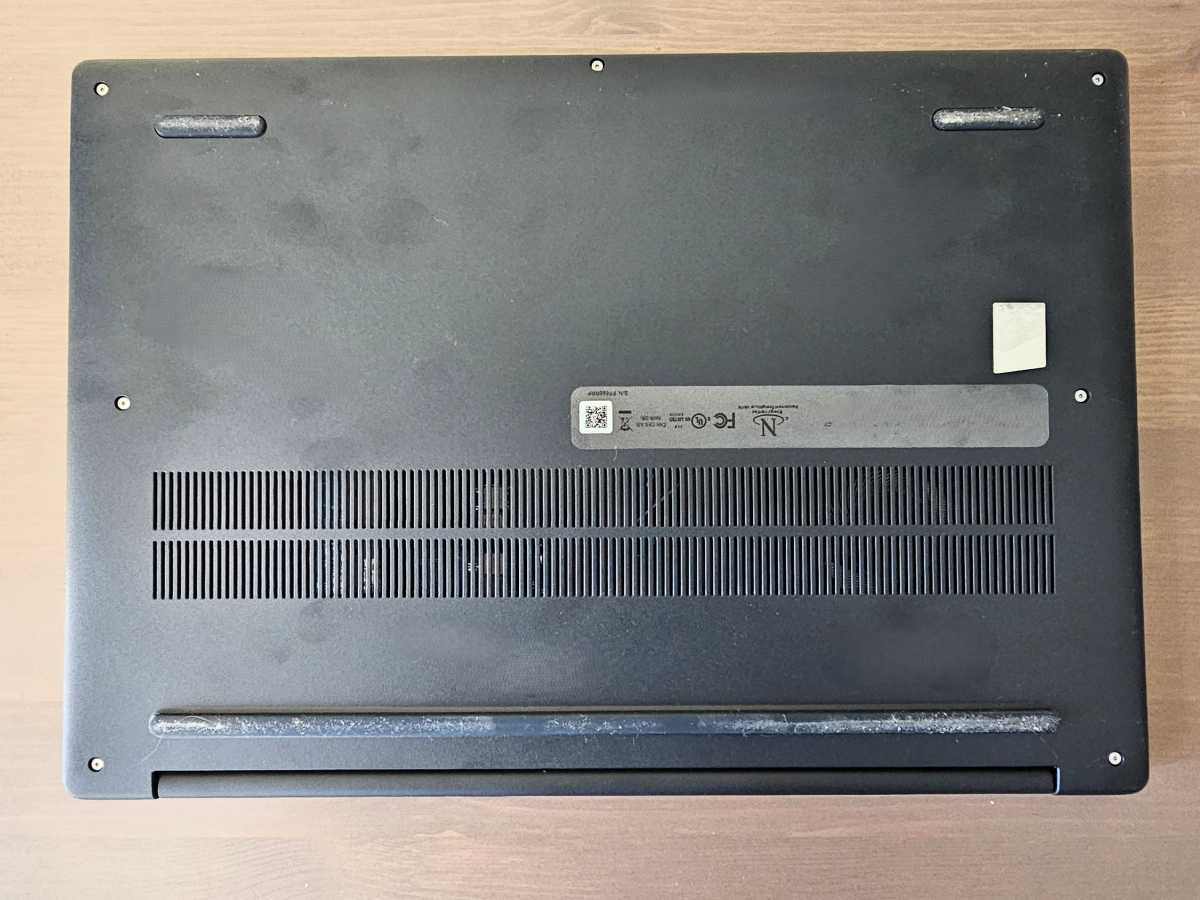
I’ve used Lenovo IdeaPads before, and ThinkPads too, and there’s a definite feeling of “budget” with Lenovo’s cheaper model this time. To be fair, that’s not immediately apparent. Lenovo used “Cosmic Blue” smooth PC-ABS plastic for the keyboard deck and chassis. I have mixed feelings about the keyboard, which isn’t bad! Lenovo’s grainy “matte” finish on the keys reminds me of cheaper laptops I’ve used in the past, though. Oh, and when you plug it in, there’s a barrel charger from years past. What’s that about? (The laptop can also charge via the USB-C port.)
Unfortunately, the finish, the charger, and the keyboard are among the first things to greet any new laptop owner. When we think about a competing laptop like the Apple MacBook Neo, one of the reasons that Apple chose an aluminum chassis is that metal connotes both strength and luxury, aesthetically. Plastic has the opposite effect. To be fair, however, plastic helps hold down the weight of the laptop, and structurally this IdeaPad doesn’t suffer from any excessive flimsiness or bending. It feels comfortable in the hands.
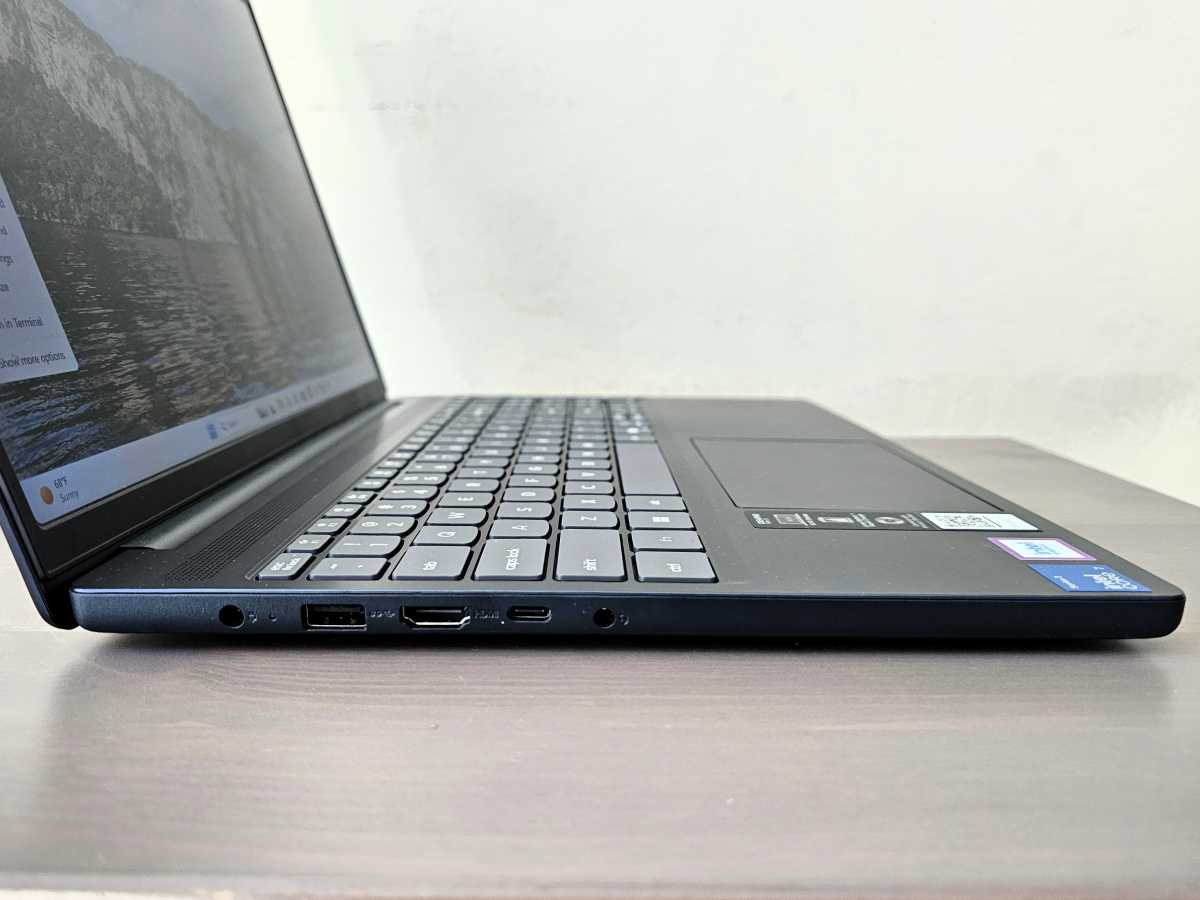
Mark Hachman / Foundry
Though the display might not be anything to write home about, anyone who pulls $900 or so out of their wallet will be perfectly happy with this laptop in that regard.
There’s one other quirk that I was surprised to find, and this has nothing to do with Lenovo. Performance was essentially the same running on battery power as it was on wall power. As far as I know, that’s a choice made by Intel’s, whose new Intel Core 3 processor (“Wildcat Lake”) is the first chip of that family I’ve seen. Maintaining the same performance across different power levels was a trick used by Qualcomm and its Snapdragon X and X2 Elite processors, and it’s interesting to see Intel adopt the same approach.
Speaking of, Intel’s Core 3 platform omits its Thunderbolt technology, so this laptop’s I/O options are a bit skimpy. You’ll find the basics: two 5Gbps USB-A ports, a very basic HDMI 1.4 port, an SD card reader, and a headphone jack. The IdeaPad Slim 3 (15IWC11) only includes a 5Gbps USB-C port, which can output DisplayPort 1.2 (not the more recent DP 1.4) video and take in from 45 to 65W in input power. Lenovo says that the HDMI port will only support up to 30 Hz on a 4K display, but the USB-C port will feed a 4K60 display. That’s not impressive.
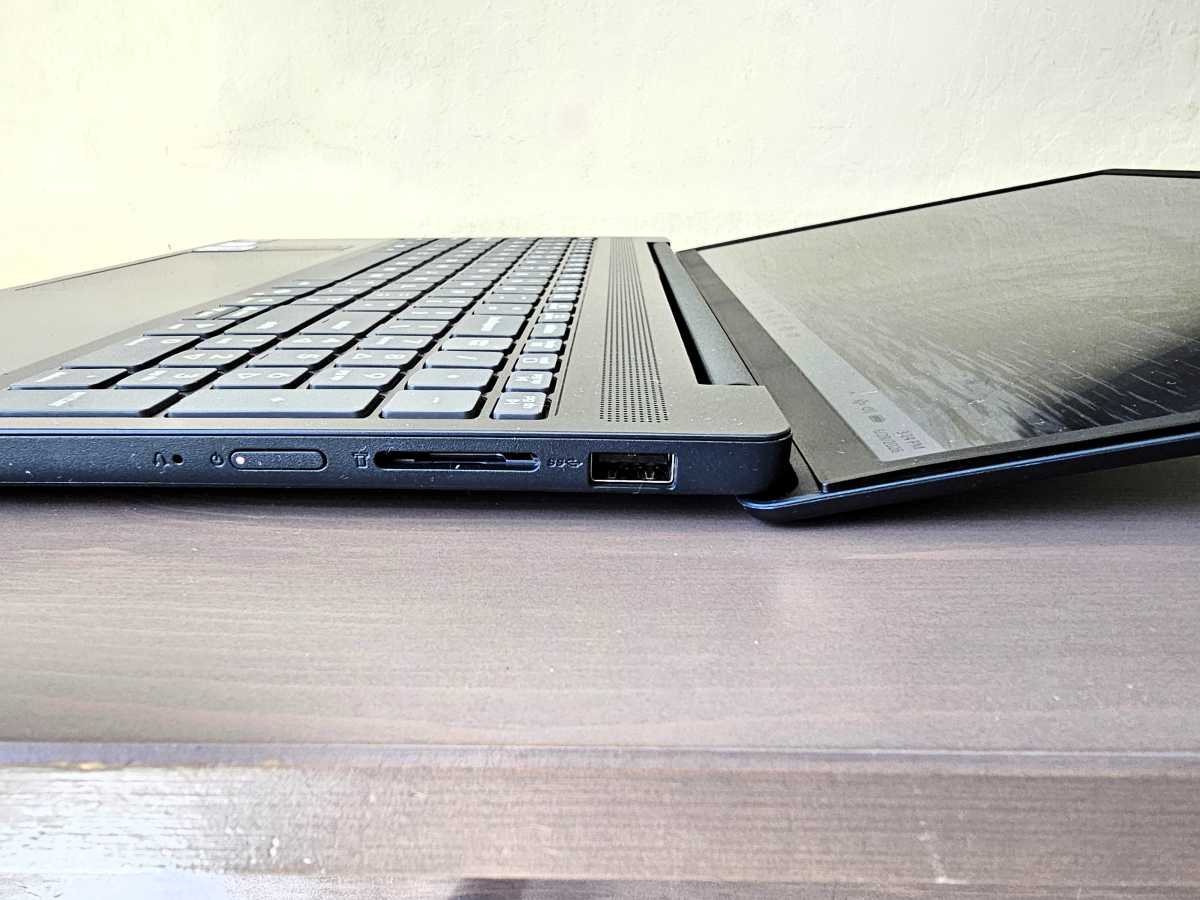
Mark Hachman / Foundry
Inside the chassis there’s just a single SODIMM slot, with 16GB of DDR5-5600 memory filling it. (Bravo to Lenovo for choosing 16GB of RAM, versus just 8.) Lenovo and Intel also chose to use Wi-Fi 6, rather than the more modern Wi-Fi 7, as well as Bluetooth 5.3. Note that Lenovo (and Qualcomm) went with Wi-Fi 7 and Bluetooth 5.4 for the comparable IdeaPad Slim 5x.
Lenovo IdeaPad Slim 3i: Display
Lenovo uses a 1920×1200, 15.3-inch WUXGA display inside the IdaPad Slim 3i, with up to a 120Hz refresh rate. That’s nice to see on a budget laptop, as the higher refresh rate can provide higher precision when necessary and ease your weary eyes. When needed, it can drop to 30Hz to save power. On my test laptop, I needed to manually adjust the refresh rate to 120 Hz; otherwise, it functioned between 30-60Hz, instead.
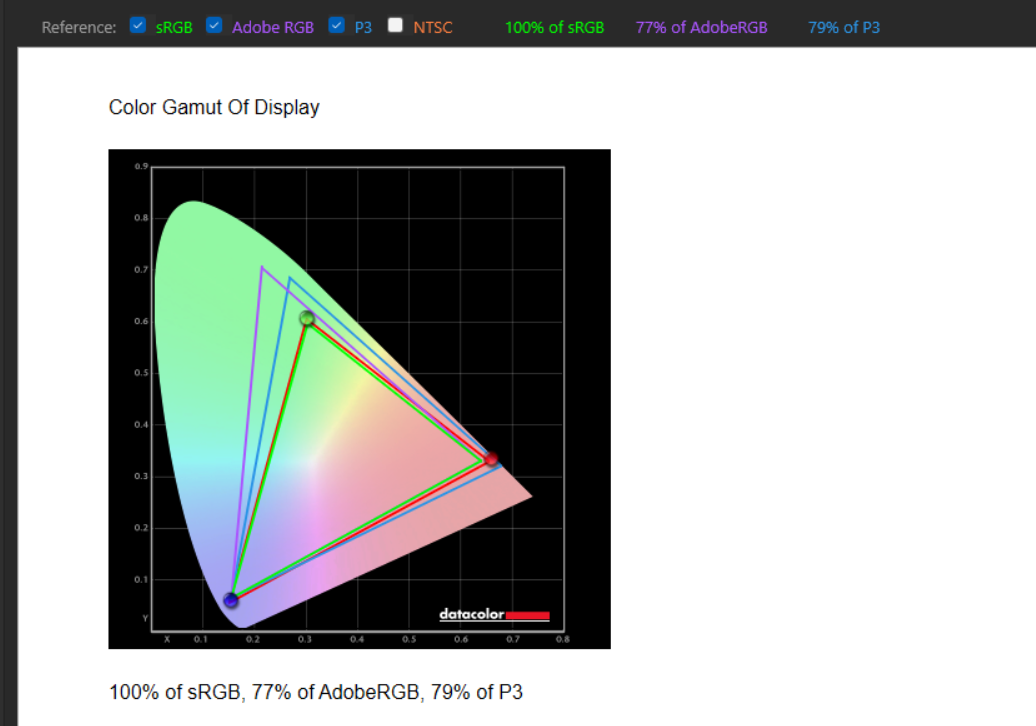
Mark Hachman / Foundry
Lenovo rates the IdeaPad’s IPS display at 400 nits; my equipment found that it put out 416 nits instead. That’s not quite enough for working outside, though our review unit included an anti-glare coating that made it easy to work indoors under lights or with sunlight shining through the windows.
Lenovo IdeaPad Slim 3i: Keyboard and touchpad
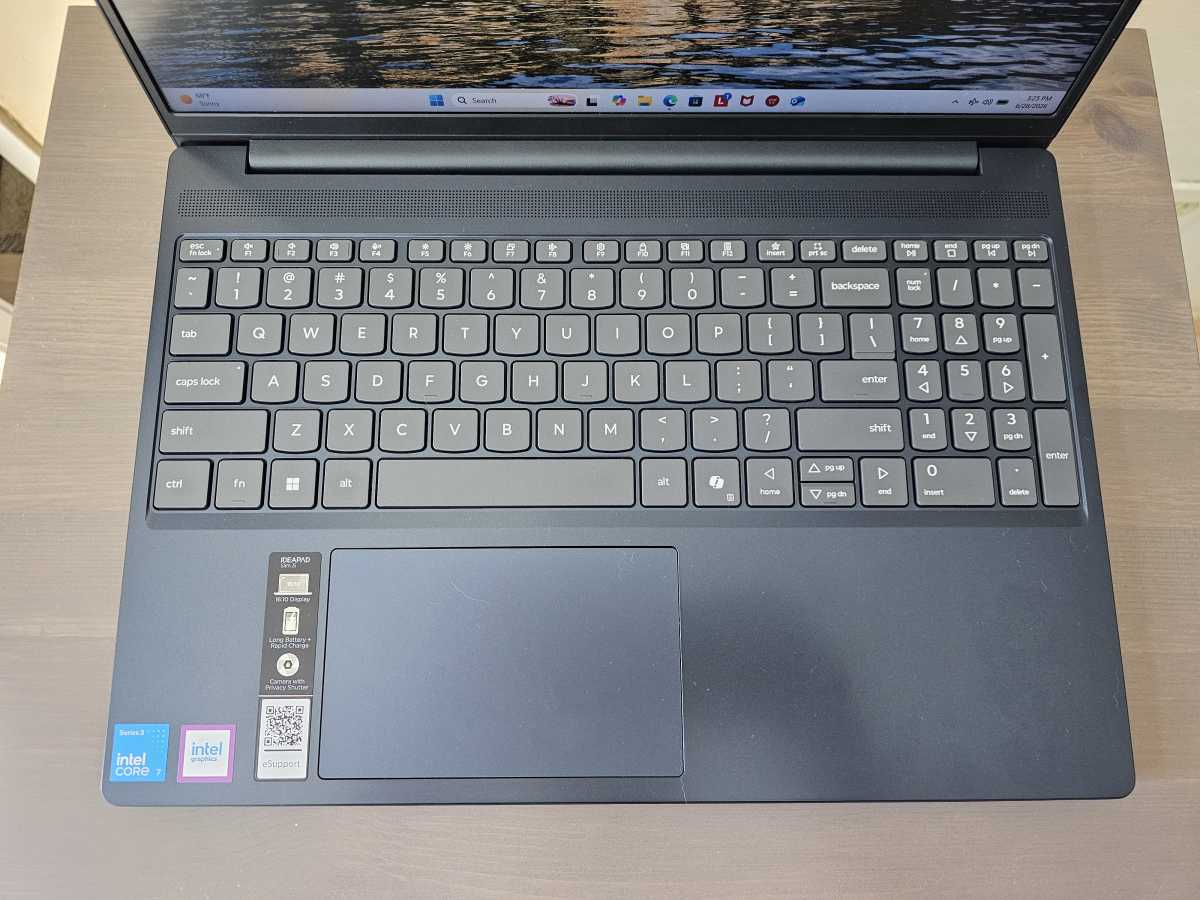
As I noted above, the IdeaPad’s keyboard isn’t bad. It simply doesn’t live up to the standards that Lenovo has set elsewhere.
Keys depress with a distinctively plastic sound, and seem to lack the resiliency of Lenovo’s other keyboards. Lenovo also made an interesting choice here. Both the IdeaPad Slim 5x and the IdeaPad Slim 3i share a similar 15.3-inch display. On the Slim 5x, Lenovo chose to add a slim speaker to either side of the keyboard, restricting its width. On the Slim 3i, Lenovo eliminated the upward-firing speakers and used the space instead to put a narrow 10-key keypad. I like that choice.
Mark Hachman / Foundry
There’s nothing remarkable about the touchpad Lenovo used. Premium models have moved to haptic touchpads which provide feedback and a clickable surface across its entirety. There’s no way I would ask a laptop maker to include such a luxury in a budget PC in 2026. ThinkPads used to include physical buttons that accompany their touchpads; IdeaPads do not.
Lenovo IdeaPad Slim 3i: Webcam, audio
This is another area where the it feels Lenovo had to cut a corner or two. A pair of 2W stereo speakers lie underneath the chassis, bolstered by Dolby Audio, but the sound sounded somewhat flat and muddy. I didn’t feel the need to plug in a headphone jack, but I still noticed the difference in audio from other laptops and sound sources. The volume was satisfactory, however.

Mark Hachman / Foundry
Unfortunately, Lenovo only includes a 720p webcam in this laptop, which made images somewhat grainy but otherwise not too shabby. The shot I took was shot during mid-afternoon, with the sun setting toward my right. If Lenovo could put a 1080p webcam in this IdeaPad, I’d approve. Otherwise, it’s an opportunity to pitch my recommendations for the best external laptop webcams, which you can add to the laptop for under $50 in some cases.
Lenovo’s Vantage built-in Vantage software has some smart webcam features, including the option to unmute your mic once you begin speaking. Alternatively, it can leave your mic in mute mode when background noise is detected. You can also throw up an open palm or fist to unmute or mute your mic, though I’d have to imagine that this would be distracting during a meeting.
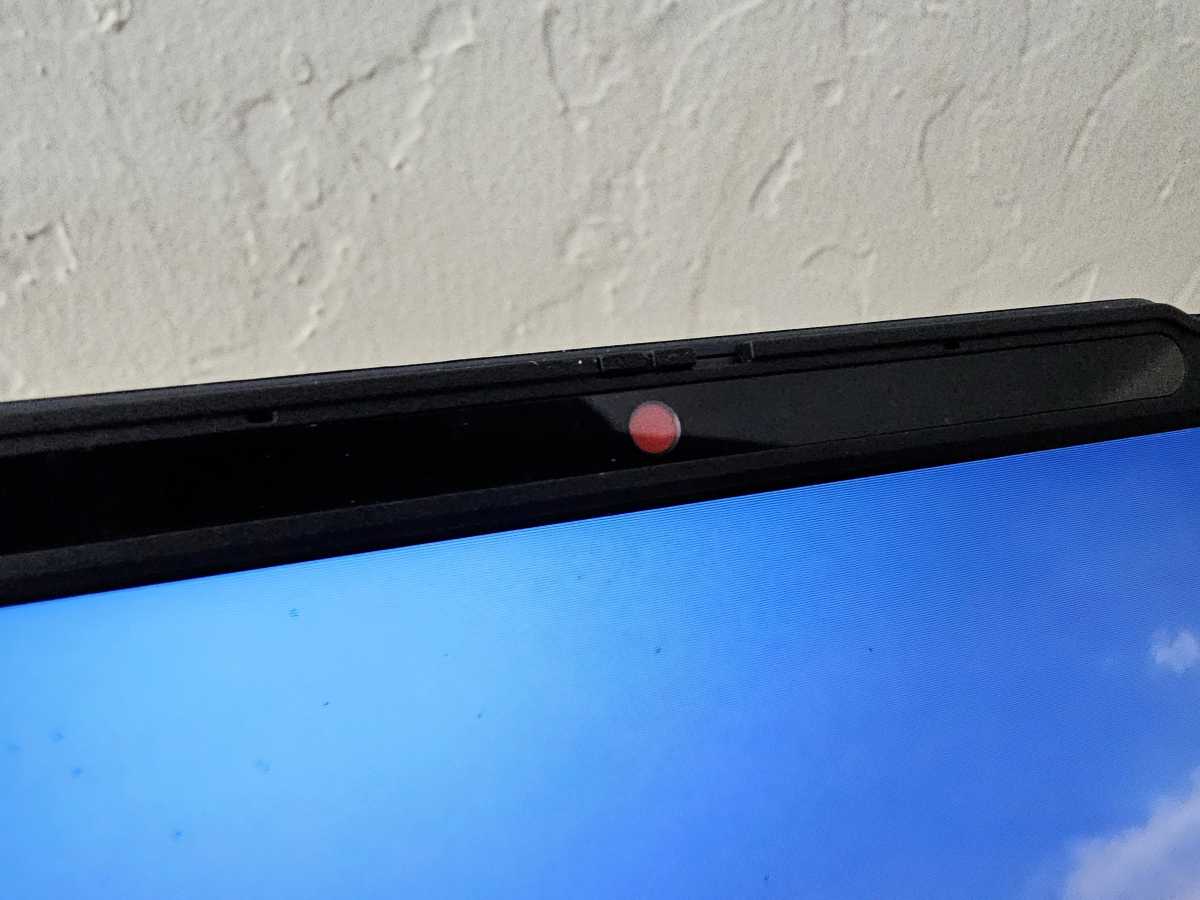
Lenovo includes a hardware privacy shutter which you can physically close using a fingernail. It’s a simple, functional design decision that I wish all laptop makers followed. You can also mute the laptop’s mics using a key on the keyboard.
Mark Hachman / Foundry
Lenovo IdeaPad Slim 3i: Performance
A large portion of the online conversation concerning the current administration has revolved around prices: inflation, memory shortages, storage shortages, as well as competing budget notebooks like the Apple MacBook Neo. It still puzzles me, then, why Intel soft-pedaled the rollout of the Core Series 3 or Wildcat Lake chip. Apple’s unexpected price hikes pushed the Neo to $699 and above, however, which puts our $899 review configuration at least on the periphery of the conversation. Price matters.
The Wildcat Lake chip (the Core 7 350) inside our review unit includes two “Cougar Cove” performance cores and four of Intel’s “Darkmont” low-power efficiency cores, lifted from Intel’s excellent Core Ultra 3 (Panther Lake) series. The most significant change is in the graphics; while high-end Panther Lake X7 and X9 chips include up to 12 Xe cores, the Core 7 350 has but two. That will lower graphics performance quite a bit.
There’s also a tweak that you won’t see reflected in these results: as far as I can tell, Intel did nothing to adjust the power or frequency under any scenario: the Cinebench 2024 benchmark, for example, reported the same result on wall power, on battery, and with the Windows performance slider turned to maximum while on wall power. I’ve never seen that before, with any Intel chip I’ve tested. (Intel’s Core Ultra 300 “Panther Lake” chips came close, but its Meteor Lake, Lunar Lake, and Arrow Lake chips all had measurable differences between wall and battery performance.)
Qualcomm’s Snapdragon X1 and X2 Windows on Arm chips do maintain performance on battery as well as on wall power, however, and Qualcomm has been quick to point that out. Now, that advantage has dissipated.
And what you see is what you get: some laptops’ performance diminishes over time, as the laptop and its components heat up under prolonged use. In such a case, the laptop dials down the performance to prevent overheating and damage. Not here. Neither the CPU nor the GPU throttled down at all under prolonged stress tests.
Mark Hachman / Foundry
Matthew Smith’s recent IdeaPad Slim 5x review used a well-chosen suite of budget and slightly pricier laptops, so we’ll add Lenovo’s latest IdeaPad to the mix. Two other IdeaPads are compared here as well.
We’ve included the $899 Lenovo IdeaPad Slim 5x, and the $999 HP OmniBook 3, which use a Qualcomm Snapdragon X2 Plus and Snapdragon X chip, respectively. We also include a pair of laptops powered by Intel’s Core Ultra 2 chips (Lunar Lake): the $1,099 Acer Aspire 16 AI and the $1,349 Asus VivoBook 16 Flip.
To that we add Intel’s next-gen “Arrow Lake” chip, the Core Ultra 7 255U, inside the $1,199 HP OmniBook 5 16. (This laptop now sells for about $649.) Finally, we compare Lenovo’s laptop to the $1,529 MSI Prestige Flip AI+ with Intel’s Panther Lake chip inside, as well as the $899 Lenovo IdeaPad 5a 2-in-1 with an AMD Ryzen AI 430 chip inside.
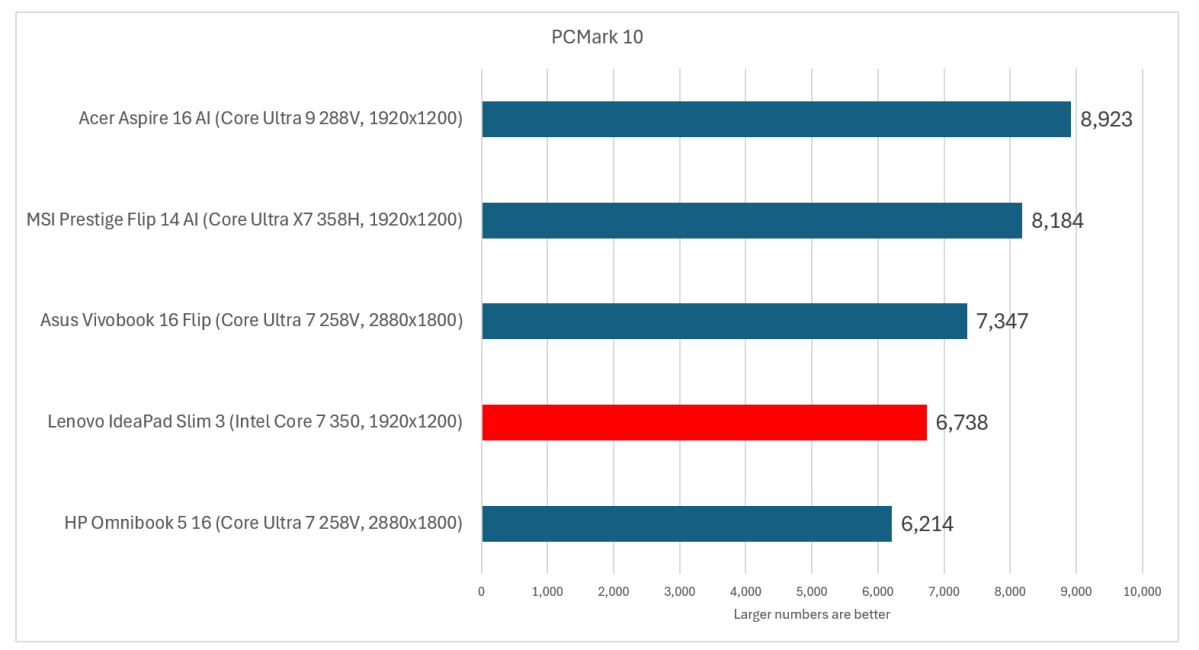
We typically use four major performance tasks to evaluate a laptop, beginning with PCMark 10. Though its developer UL also offers tests that directly measure the performance of Microsoft’s Office apps and web work, PCMark 10 has stuck around for its breadth of applications from video calls to some CAD tests. We may eventually pass it over, but its real tests of real applications are still quite relevant in my book. The only problem? Certain portions of the test won’t run on Windows on Arm processors, so the IdeaPad Slim 5x and HP OmniBook 3 are left out.
Mark Hachman / Foundry
In this test, Lenovo’s IdeaPad falls near to the bottom of the pack. HP’s OmniBook is beneath it, but again, market forces have pushed the price about $250 less than the IdeaPad. Two years ago, I might have waved away an older laptop at a cheaper price, but the budget market feels much more price-sensitive now.
Technically, the IdeaPad’s performance did drop slightly when unplugged, from 6,738 to 6,666, but that’s only a two percent difference and probably not meaningful.
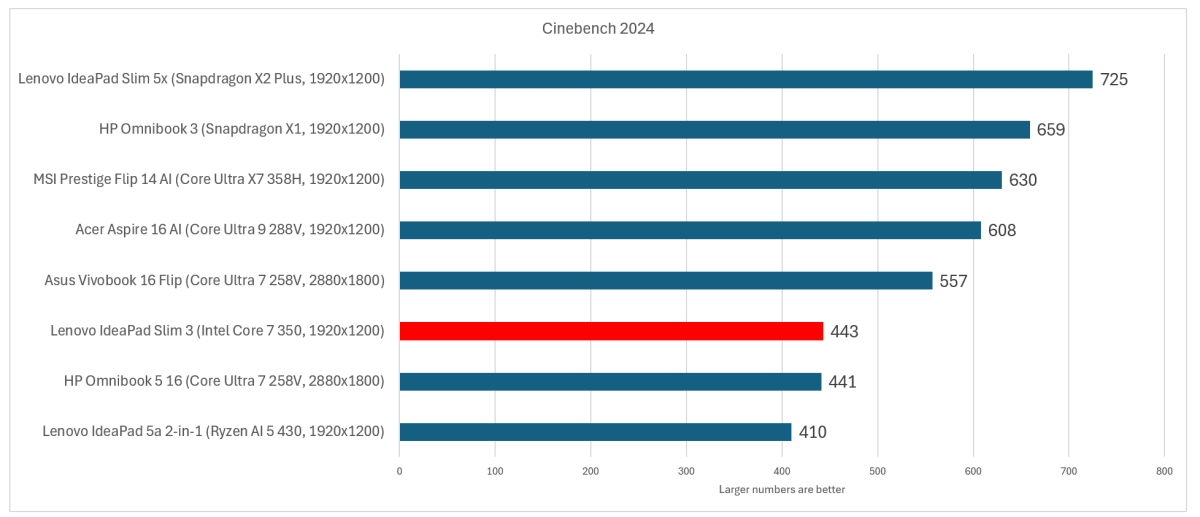
Cinebench 2024 is a good proxy for how well the laptop will perform on other CPU-specific tasks. Again, the laptop delivers disappointing results. Interestingly, I have an Asus Swift with a Ryzen AI 400 chip inside it that I’m also testing, and that scores about 630 in the multithreaded test, indicating that AMD’s new Ryzen AI 400 chip can perform much better than early results would signal.
Mark Hachman / Foundry
For comparison’s sake, the Intel Core 7 350 inside the IdeaPad scored 114 in the single-thread CPU test. Since operating systems tend to dedicate a single thread to their management, I use that as a stand-in for typical Windows performance. Again, it’s not great. By comparison, Intel M4 silicon lands in the 175 range, part of the reason Macs feel so snappy.
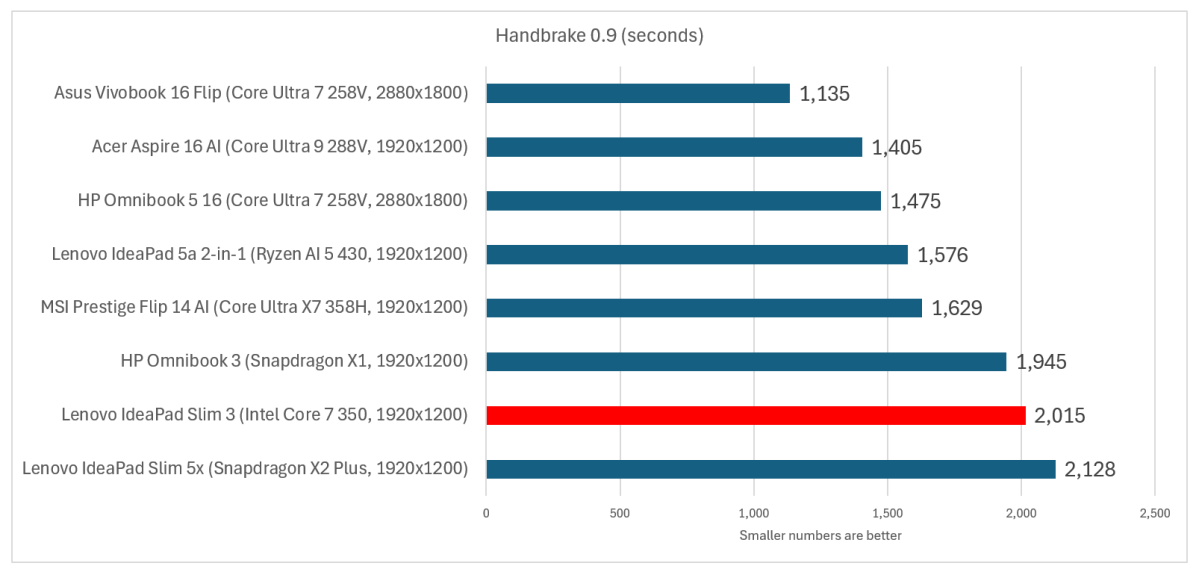
I will say, though, that the Core 7 350 and the IdeaPad run nice and cool. As I noted above, stress-testing the laptop with a prolonged workload had no effect. Neither did unplugging it nor changing the Windows performance settings. Handbrake is a prolonged transcoding test that essentially measures CPU performance. I ran the test thrice in succession and saw a slight drop from 2,014 seconds to complete the task to 1,982 on the final run — hardly anything.
Mark Hachman / Foundry
Still, this IdeaPad is still slow compared to the competition. Is it worth it to pay $1,099 ($200 more) for an Acer Aspire 16 AI and shave about ten minutes off a prolonged task? These are the kind of questions our benchmarks are designed to provoke.
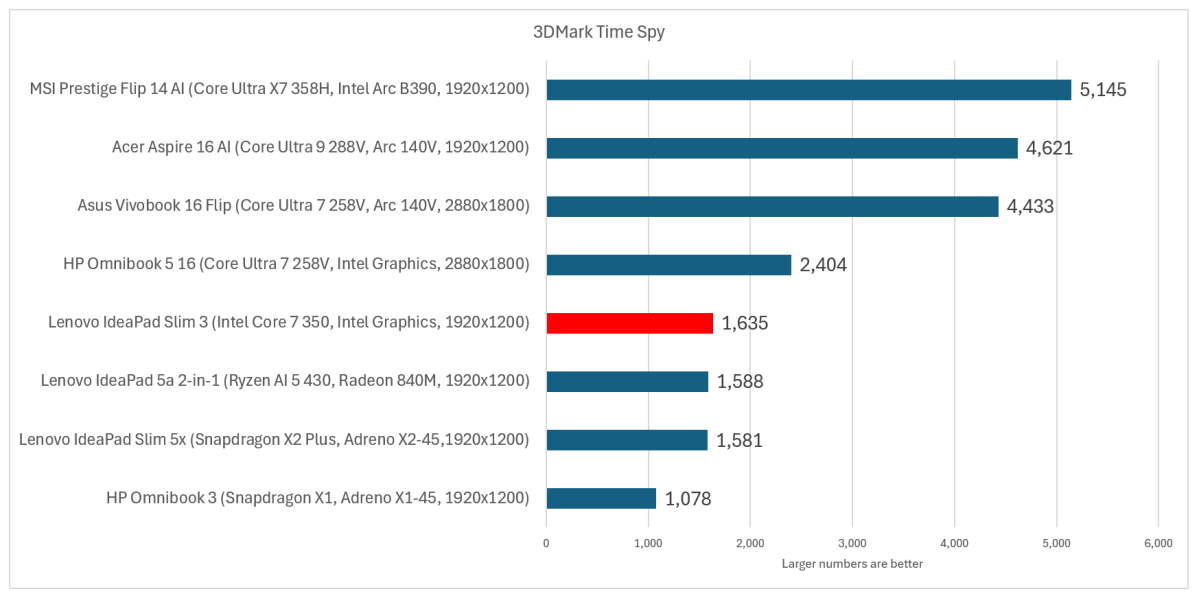
I was actually a little surprised that the IdeaPad did so comparatively well, though Qualcomm’s Snapdragon X2 Elite Extreme (not shown) performs far better than the Plus — about 4,236 versus 1,581. We’re testing budget laptops, but we included Intel’s powerful Panther Lake, so we should be fair. Just a pair of Xe graphics cores inside Lenovo’s IdeaPad doesn’t really cut it, however…
Mark Hachman / Foundry
Or does it? The magic formula with most modern graphics is if they include support from graphics upscaling and frame generation, which can take an absolute dog in 3D graphics and wring out a decent gaming experience. I tested Cyberpunk:2077 on 1080p resolution, Low settings, and the results were unplayable: 36 frames per second (37 fps unplugged). Turn on both frame generation and scaling, however, and frame rates soar to 83 fps and 80 fps, respectively, with minimum framerates of 60 fps. We use 60 fps as a minimum measure of acceptable gameplay, so this passes.
Without support, though, you’re up a creek. Eidos’ Shadow of the Tomb Raider does not support XeSS upscaling or frame generation, and framerates were stuck at a glacial 16 fps. Oh well.
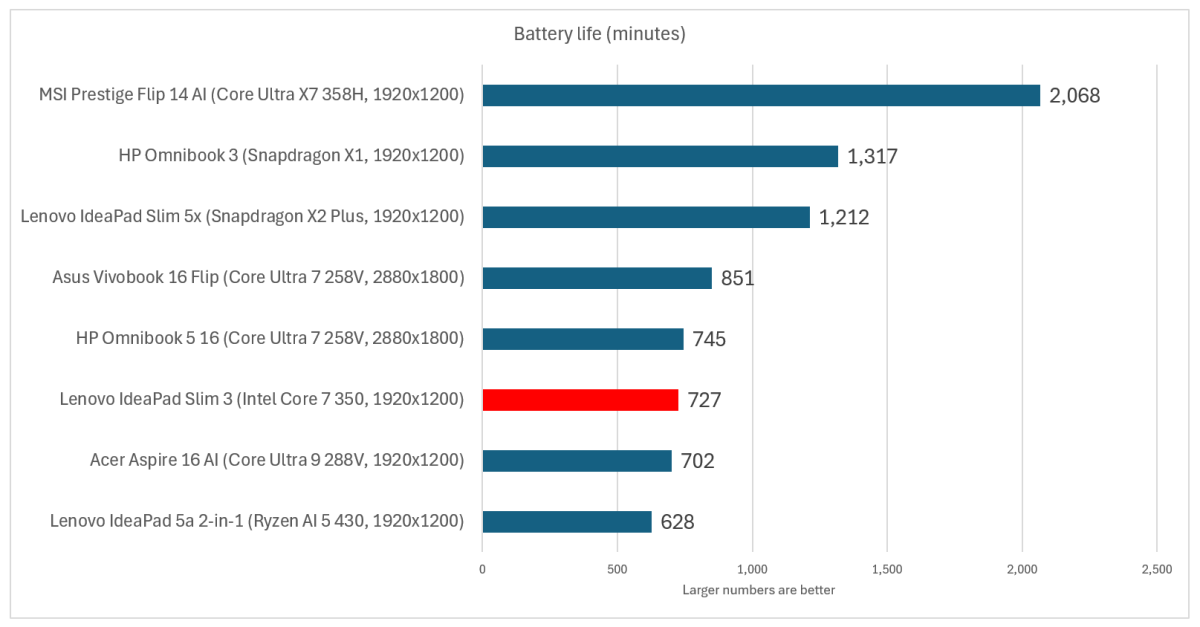
You’ve seen me grumble about battery-life testing, and whether it performs meaningful work. Lenovo’s IdeaPad delivered 12 hours, seven minutes of runtime when looping a 4K video, great on paper but still not all that hot when tested against the competition.
Mark Hachman / Foundry
If you need to quickly get back on the go, Lenovo’s “Rapid Charge Boost” technology applies what the company claims to be two hours worth of battery after charging for 15 minutes. After a rundown test, the laptop reported the charge at a flat zero percent — reduce it far enough and the laptop won’t even boot. After a timed fifteen minutes of charge, the laptop reported 29 percent.
When I applied a similar test — Procyon’s looped productivity benchmark, which offers the equivalent of “work” using Microsoft’s Microsoft 365 apps — performance dropped to eight hours 23 minutes. I’d consider that to be a more accurate representation of the IdeaPad’s battery life. Also, Lenovo’s Rapid Charge Boost claim holds up here. The 29 percent of battery the laptop charged to equates to just under 2.5 hours of battery life.
Should you buy the Lenovo IdeaPad Slim 3i?
Behind the scenes, Intel is apparently trying to make its Wildcat Lake chip (and laptops like the Lenovo IdeaPad) a viable option in the mainstream. Intel formally refers to this program as “mainstream reimagined,” or Project Firefly. This may not be a Project Firefly laptop, but it’s also not a great debut for Wildcat Lake as a whole.
On the other hand, it’s fair to say that the Lenovo IdeaPad is cheaper than the competition, but it also performs as well or worse. That means that you won’t be buying a diamond in the rough, just a step down in price and performance.
Lenovo cut a few corners here, and the IdeaPad suffers for it. I’m not going to tell you not to buy it, but you’d probably be better served by looking at any of the 2025 laptops with Intel Lunar Lake (Core Ultra 200), AMD Ryzen AI 300, or Qualcomm Snapdragon X1/X2 chips, and trying to find one near this $899 price point. Your next click should be our laptop deals page to see what strikes your fancy.
