Table of Contents
At a glance
Expert’s Rating
Pros
- Vivid, sharp OLED touchscreen
- Mics suppress background noise wonderfully
- Expandable memory and storage
- Respectable overall performance
- Good keyboard and number pad
Cons
- Prosumer pricing
- dGPU isn’t a heavy hitter
- Big and heavy
- Battery life is disappointing
Our Verdict
The Lenovo ThinkPad P16s Gen 4 is a typical workstation affair. It’s fairly potent but big, bulky, and pricey. Next to Consumer laptops, its performance doesn’t impress, and new Panther Lake hardware threatens it at every turn.
Price When Reviewed
This value will show the geolocated pricing text for product undefined
Best Pricing Today
Price When Reviewed
$4,218
Best Prices Today: Lenovo ThinkPad P16s Gen 4


Lenovo’s new ThinkPad P16s Gen 4 is a big workstation with a touch of luxury from its OLED display. It’s built to meet a variety of MIL-STD 810H durability tests, and it has a wide selection of hardware including discrete GPU options and high-performance CPUs. As a workstation, it doesn’t come cheap, though. And the high price tag puts it in a bind, as anyone who doesn’t need things like ISV certifications can get a lot more for their money.
Lenovo ThinkPad P16s Gen 4: Specs and features
- CPU: Intel Core Ultra 7 265H (vPro)
- Memory: 64GB DDR5-6500
- Graphics/GPU: Nvidia RTX Pro 500 6GB
- Display: 16-inch 3840×2400 OLED touchscreen, anti-glare, 60Hz, Dolby Vision
- Storage: 2TB PCIe 5.0 SSD – Samsung MZVLC2T0HBLD-00BLL
- Webcam: 5MP +IR
- Connectivity: 2x Thunderbolt 4 / USB-C with Power Delivery, 2x USB-A 5Gbps, 1x Ethernet, 1x HDMI 2.1, 1x 3.5mm combo audio
- Networking: Wi-Fi 7, Bluetooth 5.4
- Biometrics: Windows Hello fingerprint, facial recognition
- Battery capacity: 75 watt-hours
- Dimensions: 14.24 x 9.79 x 1 inches
- Weight: 4.27 pounds
- MSRP: $4,218 as-tested ($1,599 base)
The Lenovo ThinkPad P16s Gen 4 comes in a host of configurations ranging in price from $1,599 (or cheaper with Lenovo’s perpetual online discounts) to $4,680 for a top-end configuration. Specific configuration options will vary depending on the retailer.
Our specific configuration has the specifications above and was on sale for $4,009 at B&H and $4,218 at CDW. Worth noting: though the storage is indicated as a PCIe Gen 5 drive, a speed test showed the drive in our system performing in line with PCIe 4.0 x4 speeds, albeit at the high end of that range.
Through Lenovo’s custom configurator, the system can come with a range of CPUs from the Core Ultra 5 225H up to the Core Ultra 9 285H. It also supports vPro and non-vPro options. Whether or not the system supports a discrete graphics processor depends on the CPU, and the top-end CPU doesn’t support a dGPU. For configurations that include a dGPU, Lenovo offers the RTX Pro 500 or RTX Pro 1000.
You can get 16, 32, or 96GB of memory and 512GB, 1TB, or 2TB of storage. The display options range from a very basic 1920×1200 anti-glare panel that’s at least bright at 400 nits or a 500-nit version that’s low power and offers more color gamut up to the 3840×2400 touchscreen OLED version tested here, which offers 100 percent DCI-P3 color coverage, 400 nits of brightness, and Dolby Vision support. Lenovo offers some extras like 4G connectivity and a smart card reader. It also has an option for either a 75Wh or 57Wh battery.
The Lenovo ThinkPad P16s Gen 4 is a solid tank of a laptop. It’s sturdily built and serves well as a workstation, offering a solid keyboard with a number pad, a smooth trackpad, and a sharp, great-looking display.
Lenovo ThinkPad P16s Gen 4: Design and build quality

Foundry / Mark Knapp
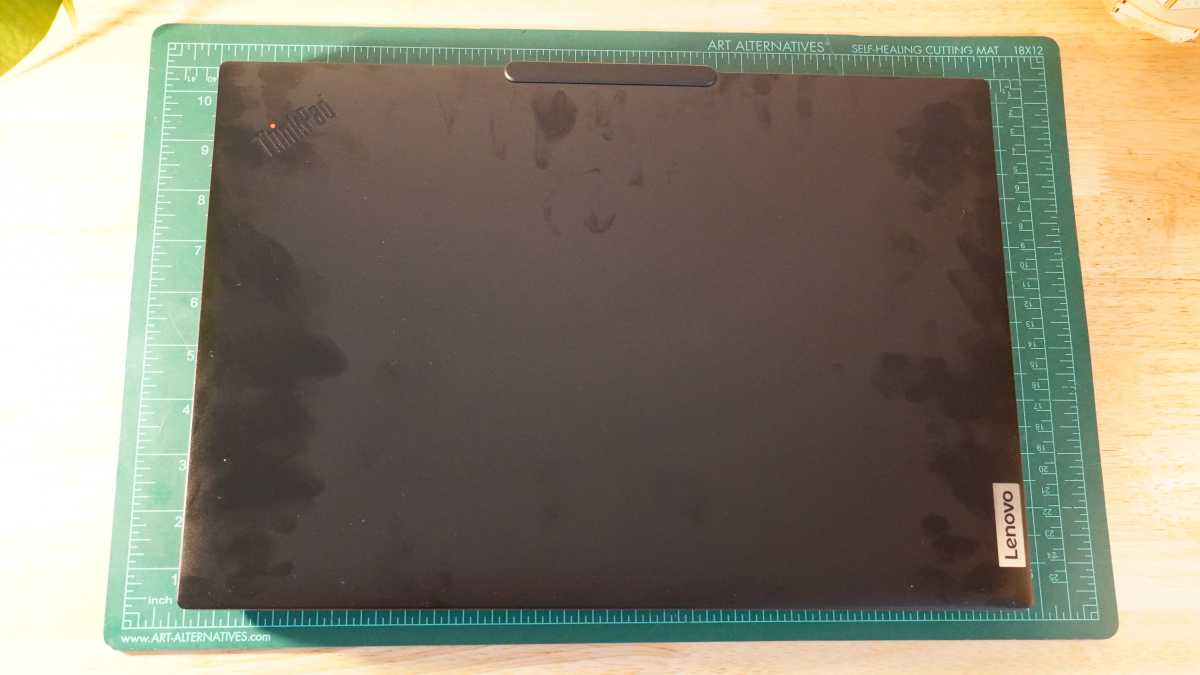
The Lenovo ThinkPad P16s Gen 4 is no thin-and-light laptop. It’s a mobile workstation with the bulk it needs to bring proper cooling to its internals and fit its 16-inch display. The bezels around the display aren’t terribly big either, so the system couldn’t really have been much smaller without opting for a smaller screen. That said, the thickness is considerable at one inch with the rubber feet on the bottom factored in. This can make it tricky to slip into some laptop sleeves. Even with its size, the Lenovo ThinkPad P16s Gen 4 isn’t terribly weighty at 4.27 pounds.
The design has the typical ThinkPad stylings with a blacked out colorway. The lid and base of the Lenovo ThinkPad P16s Gen 4 don’t use the typical carbon-fiber reinforced polymer many other ThinkPads do though. Instead, it uses aluminum. The keyboard deck still has a soft-touch finish. Both materials show finger oils quite easily.
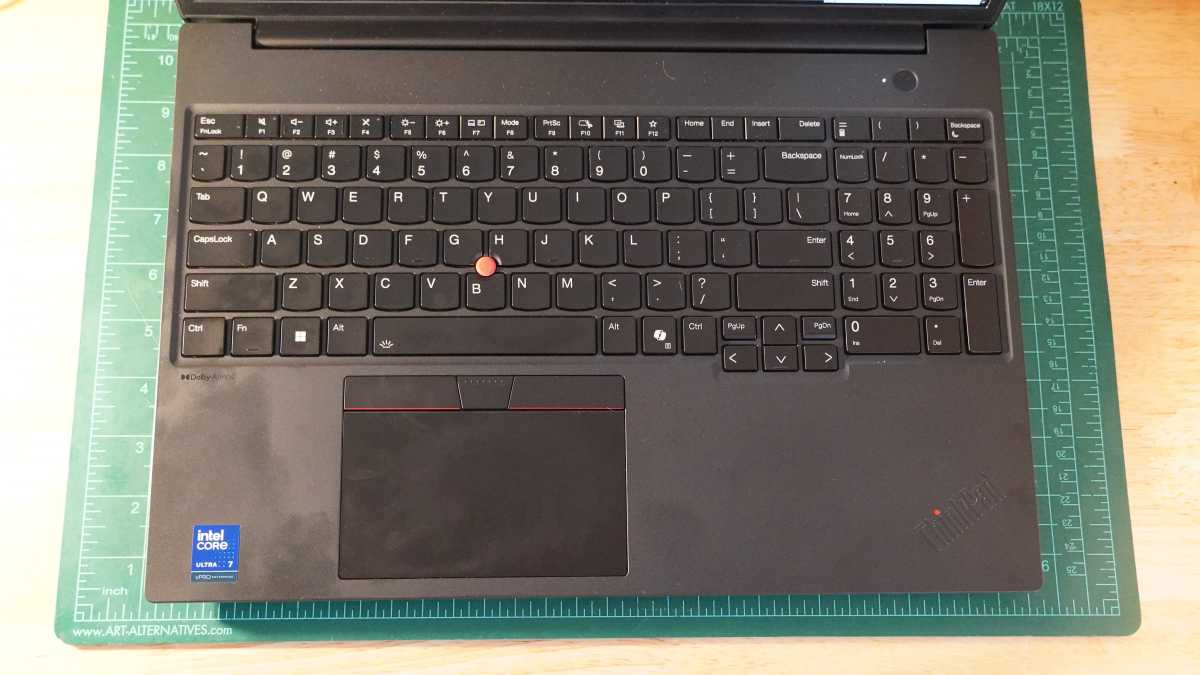
Lenovo takes advantage of the space on the keyboard deck to fit in a near-full-size number pad and offset its arrow keys, even if they remain quite small. The trackpad is pretty modest in size considering all the space it has available to it. Lenovo also kept the speakers on the bottom, tucked behind small grilles at the front edge of the base, even though there was plenty of space above the keyboard for up-firing speakers.
Underneath, the vents to the two cooling fans get a fine mesh filter to keep dust out. Hot exhaust blows out the thin gaps between the base of the keyboard and the display hinge.
The Lenovo ThinkPad P16s Gen 4’s build feels plenty sturdy, and Lenovo has validated it through some pretty extreme testing conditions. The keyboard deck doesn’t flex much, nor does the display lid. The hinge does wiggle a little after moving and has subtle wobble while typing, but it’s not bad. Thanks to the weight of the base and the little lip Lenovo puts on its display lids, the Lenovo ThinkPad P16s Gen 4 is easy to open one-handed.
One thing the extra size of the laptop does get you is some useful internal space. The system may come with one M.2 SSD installed, but it has space for a second one (with PCIe 4.0 x4 bandwidth). It also uses CSODIMM memory, so you can change out the sticks as needed. It will take removing eight screws to get inside, though.
Lenovo ThinkPad P16s Gen 4: Keyboard, trackpad
Foundry / Mark Knapp
Like many ThinkPads, the Lenovo ThinkPad P16s Gen 4 has a solid keyboard. It has effective backlighting and a spill-resistant design, though don’t spill anything that will leave sticky residue when it evaporates. The keys have a bit more resistance than most, which provides extra tactile feel to each keypress. It can make light-fingered typing a little trickier, but I found it overall satisfying.
I was able to get up to a 112-word-per-minute typing speed in Monkeytype with 98 percent accuracy after some adjusting. The small, offset arrow keys are a little harder to use as it’s easy to accidentally hit the Page Up and Page Down keys. Having a big number pad is a bonus for data entry, though it also takes a little adjusting since it’s not quite full-width.
The small trackpoint nub in the middle of the keyboard may be a nuisance for some users, but if you get familiar with it, it can be a quick and accurate trackpad alternative that requires less hand movement. The trackpad is fine. Its mylar surface is pleasantly smooth, and it’s a decent size, though the physical buttons at the top take a chunk out of it. Even though it’s not small, it feels small on such a big laptop. For right-handed use, I feel like I’m reaching a little too far across my body to use it and often accidentally right-click when I mean to left-click.
Lenovo ThinkPad P16s Gen 4: Display, audio
Foundry / Mark Knapp
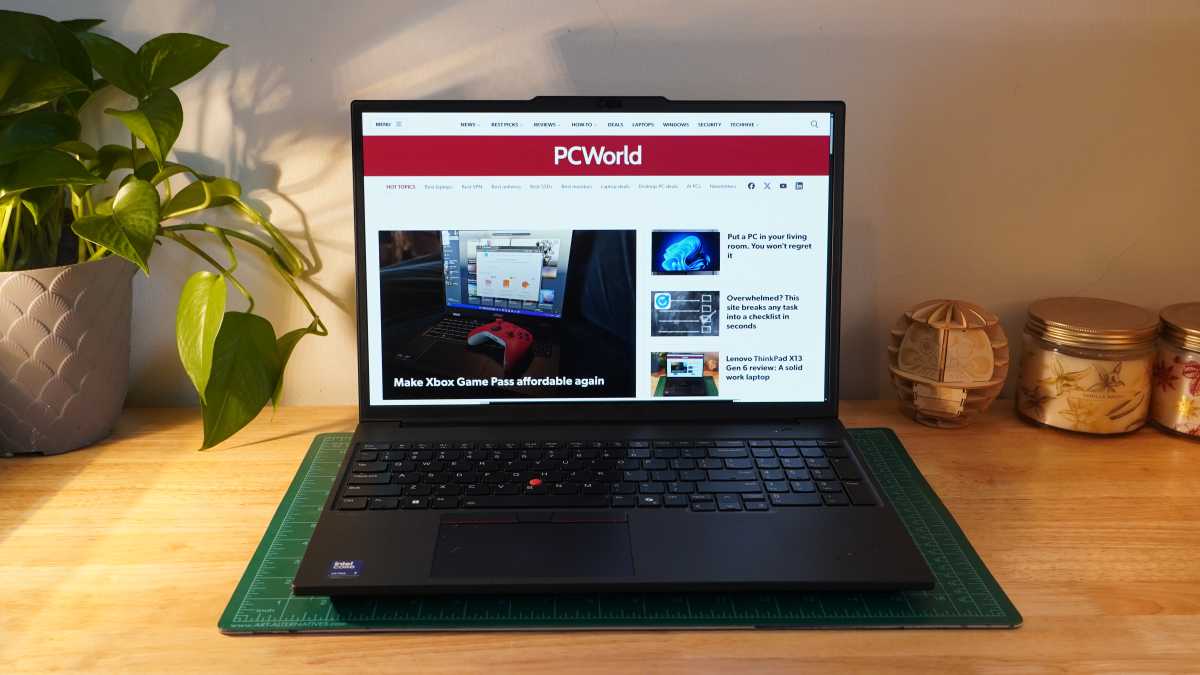
The display on the Lenovo ThinkPad P16s Gen 4 has plenty to like. It’s big and sharp, providing very clear fine details in general. The touchscreen is fairly responsive, though doesn’t feel as smooth as it might if the display went above 60Hz. The touch digitizer is mostly invisible, though it does appear on large, bright sections of the screen at close viewing distances. The display reaches 402 nits in our testing and pairs that brightness with OLED’s infinite contrast and full 100 percent DCI-P3 coverage. Color accuracy was also strong with a max dE1976 of 2.03.
One surprising detail was how dim the display could go, too, with the lowest brightness setting seeing the display reach a white point of 0.9 nits. Visibility could be a little better though. The anti-reflective coating of the display subdues reflections slightly, but isn’t as capable as a matte finish.
The speakers on the system aren’t half bad. They put out a good amount of volume, and their mid-focused sound works well for speech. For music, their harsher qualities start to show with some excess sibilance that makes them far less pleasant. They don’t provide much bass either.
Lenovo ThinkPad P16s Gen 4: Webcam, microphone, biometrics

Foundry / Mark Knapp
The Lenovo ThinkPad P16s Gen 4 offers a solid setup for video conferencing. The 5MP camera can still struggle without perfect lighting, ending up a touch grainy, but it is still sharper than most and provides a good, natural exposure. It also has a handy privacy shutter that makes it clear when it’s hidden away.
It’s paired with a solid pair of far-field mics that work wonders with Dolby Voice noise suppression. This feature activates automatically when the mics turn on, and I was surprised to hear my voice not only coming through very naturally without noticeable compression, while even extreme background noises were completely eliminated.
A small fan I turned on in the middle of recording has a faulty motor that begins to shriek a second after I turn it on, and the mics on the Lenovo ThinkPad P16s Gen 4 continued to pick up my speech cleanly even as the fan made truly hideous noises that were nowhere to be found in my test recording.
The Lenovo ThinkPad P16s Gen 4 supports biometric login with quick and reliable Windows Hello facial recognition and a little bit less consistent fingerprint recognition. It doesn’t help that the fingerprint sensor is small and slightly recessed from the keyboard deck, giving it very limited contact area with my fingertips.
Lenovo ThinkPad P16s Gen 4: Connectivity
Foundry / Mark Knapp
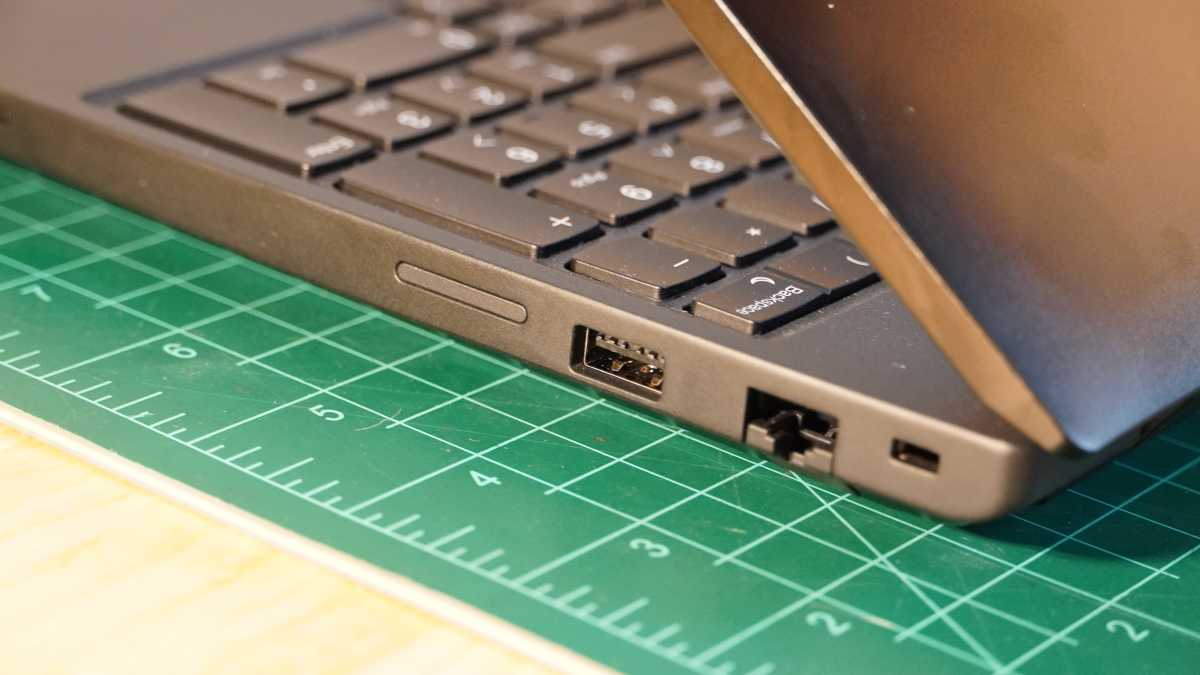
The Lenovo ThinkPad P16s Gen 4 offers good wired connectivity, though it’s not exceptional for a large machine. You’ll get two Thunderbolt 4 ports on the left side ready to handle most connections, including power. Those are flanked by a USB-A 5Gbps port, a 3.5mm jack, and an HDMI 2.1 port.
The right side adds another USB-A 5Gbps port, a Gigabit Ethernet jack, and a locking slot. Some configurations come with a SIM slot and smart card reader, but this one doesn’t. With so much space available to it, it’s surprising to not see a third USB-A or some form of SD card slot.
The wireless connectivity is solid. The Lenovo ThinkPad P16s Gen 4 comes with an Intel Wi-Fi 7 BE201 card that provides fast and stable Wi-Fi networking. It only gets Bluetooth 5.4, but that has proven reliable in testing at least.
Lenovo ThinkPad P16s Gen 4: Performance
The Lenovo ThinkPad P16s Gen 4 offers solid performance, but it’s not exceptionally powerful. It brings a potent enough CPU with the Intel Core Ultra 7 265H, and perhaps what it does best is let that chip run well under load thanks to the size and cooling of the laptop. The Nvidia RTX Pro 500 6GB helps augment performance for graphics workloads and could be somewhat useful in AI applications, but it’s not a powerhouse and its 6GB of VRAM could be limiting for bigger AI tasks.

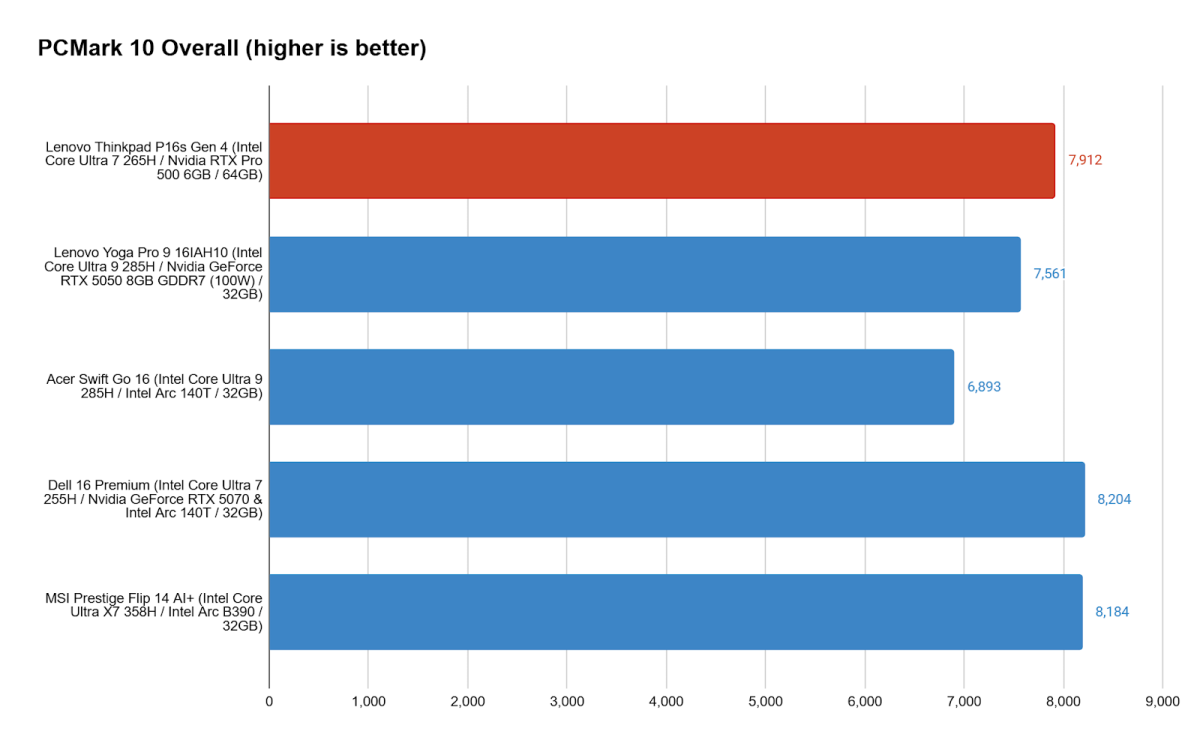
In the holistic PCMark 10 benchmark, we see that the Lenovo ThinkPad P16s Gen 4 has a good level of performance for most routine office tasks. It can hold up to spreadsheet, video conference, and media editing tasks quite well. The abundant memory onboard certainly won’t hurt in real-world usage, as it will allow you to have that many more programs open and ready to jump between.

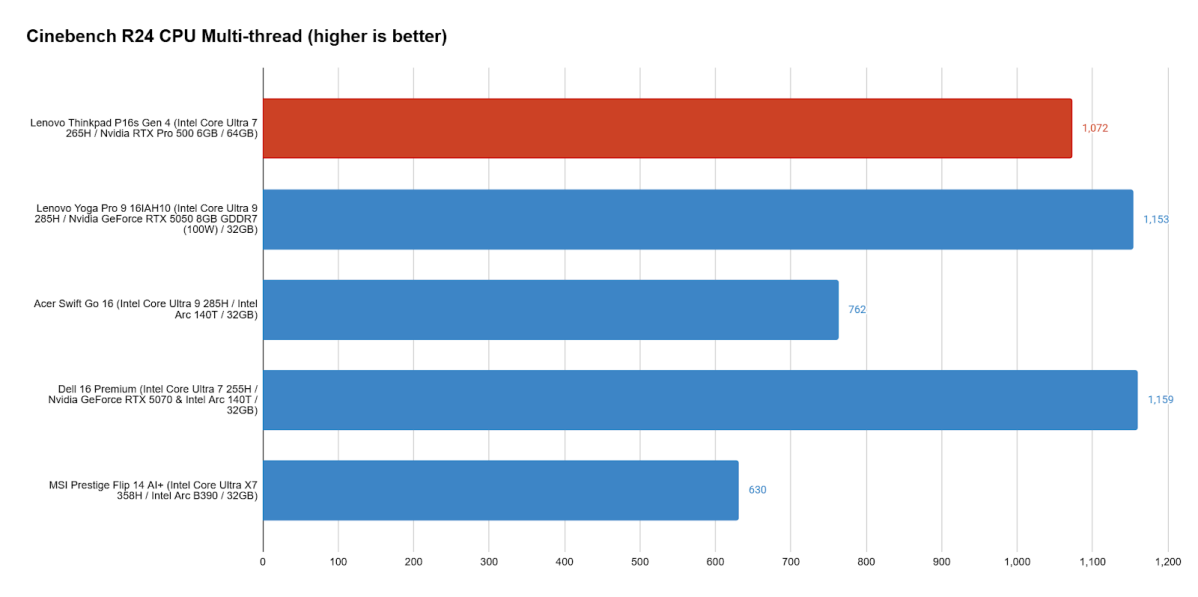
A part of that strong performance is coming from the CPU. Lenovo runs the Intel Core Ultra 7 265H well. The chip offers strong single- and multi-core performance, and it can really cruise when properly cooled. Lenovo’s not knocking it out of the park, though.
The Dell 16 Premium consistently showed higher performance levels from its lower-tier Intel Core Ultra 7 255H processor than the Lenovo ThinkPad P16s Gen 4 and even the Lenovo Yoga Pro 9 16IAH10, which has yet a higher-tier processor. And though the Lenovo ThinkPad P16s Gen 4 has a strong lead over the Panther Lake-powered MSI Prestige Flip 14 AI+, the gap narrows considerably when that laptop is set to Performance mode

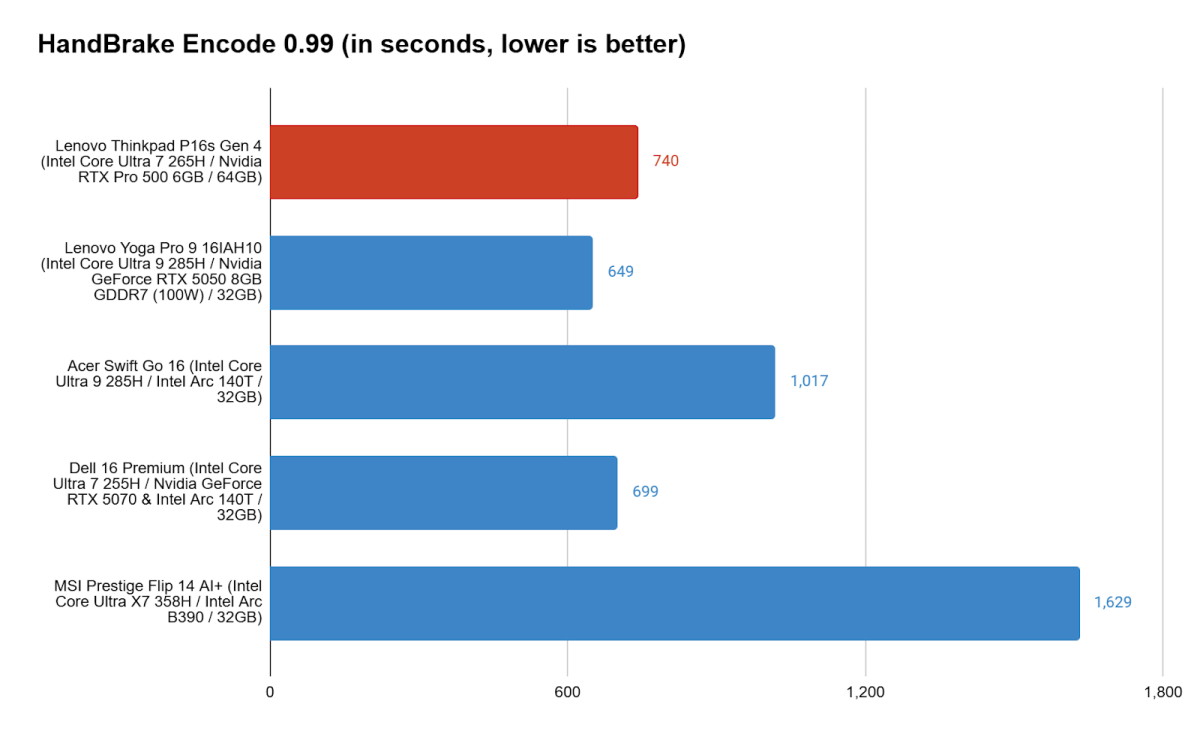
Our Handbrake encoding test helps show not only the Lenovo ThinkPad P16s Gen 4’s ability to run fast but also its ability to sustain its speeds. Encoding the large video file takes even the strongest CPUs quite some time, and that gives them a chance to build up heat. If they can’t handle that heat actively, they’ll need to slow down, and the test will end up taking much longer.
Here we see that the Lenovo ThinkPad P16s Gen 4 manages to complete the encoding task in a little over 12 minutes, which is respectable. Of course, it’s once again shown up by the Lenovo Yoga Pro 9 and Dell 16 Premium, suggesting that the CPU choice and cooling solution aren’t optimal here. While the Lenovo ThinkPad P16s Gen 4 beat the Acer Swift Go 16 and the MSI Prestige Flip 14 AI+, both of those systems ran in Balanced mode for these tests, which can restrict performance considerably on extended workloads like this.

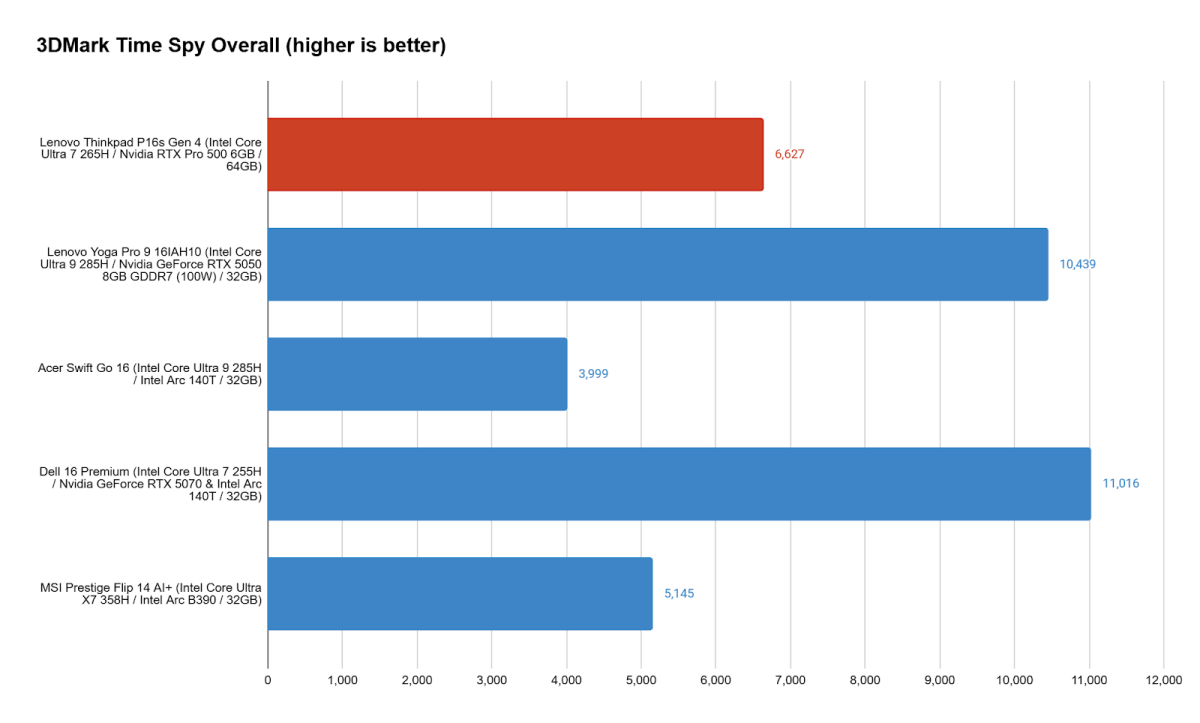
One might expect good things in the graphics department thanks to the RTX branding, but the RTX Pro 500 is a bit of a letdown. In 3DMark’s Time Spy graphical benchmark, the Lenovo ThinkPad P16s Gen 4 is decimated by the Lenovo Yoga Pro 9i Gen 10’s RTX 5050, and it’s only further outdone by Dell’s RTX 5070 (though not by as big a leap as we’d expect). Even looking at gaming machines, the $900 Acer Nitro V 16 AI (ANV16-42) with an RTX 5050 outperforms the Lenovo ThinkPad P16s Gen 4.
The Nvidia RTX Pro 500 at least gives the Lenovo ThinkPad P16s Gen 4 a leg up on systems with recent Intel Arc integrated graphics like the Acer Swift Go 16 — or, that’s what was true in 2025 anyway. With Panther Lake, systems can come with a new tier of Intel Arc graphics like the Arc B390 in the MSI Prestige Flip 14 AI+. At first glance, the MSI Prestige Flip 14 AI+ underperforms next to the Lenovo ThinkPad P16s Gen 4, but when it’s using the same Performance mode as the Lenovo ThinkPad P16s Gen 4, it actually comes ahead with an overall score of 7,233 points. And that’s from a three pound, thin-and-light laptop.
Lenovo ThinkPad P16s Gen 4: Battery life
For a laptop packing a sizable, sharp OLED screen and discrete graphics, the Lenovo ThinkPad P16s Gen 4 offers fairly respectable battery life. In our offline video playback test, which runs a 4K video file on repeat with the laptop’s display set to 250-260 nits, the Lenovo ThinkPad P16s Gen 4 lasted for just shy of six hours. A lot of gaming laptops struggle to hit that kind of runtime. The Lenovo ThinkPad P16s Gen 4 could have managed a bit more if it had opted for a bigger 99Wh battery. As it stands, the 75Wh seems a bit small for such a large laptop.
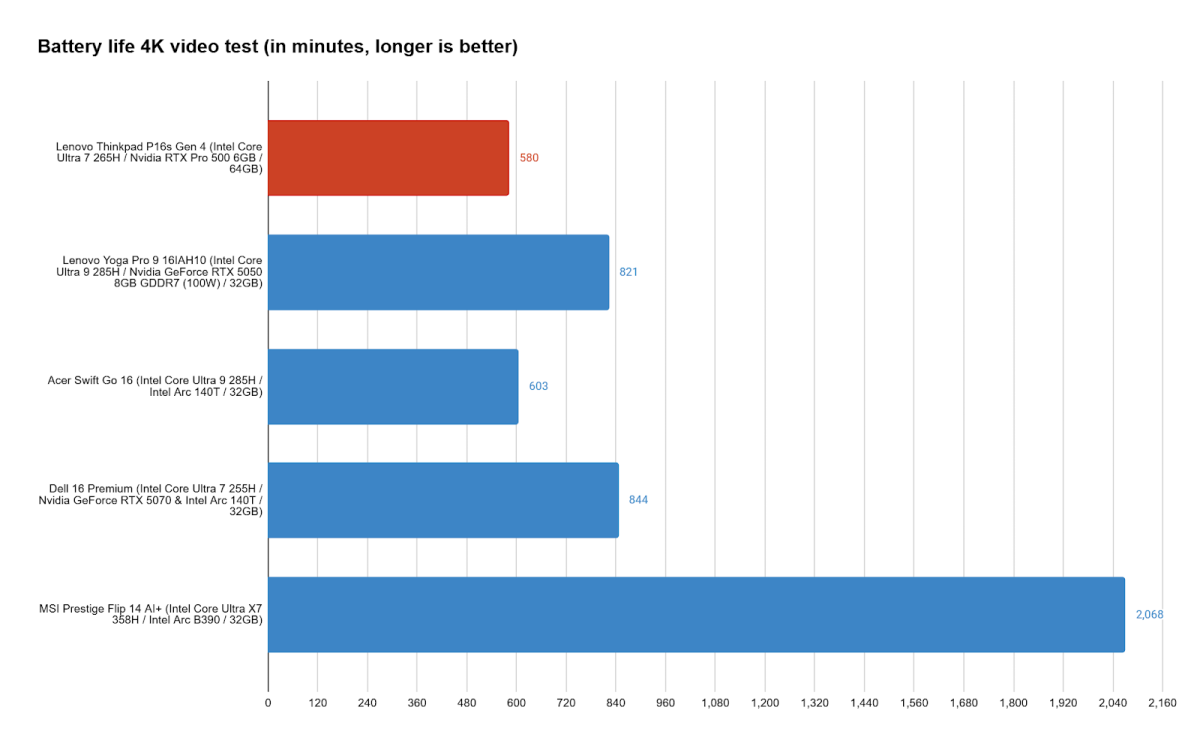
The trouble that the Lenovo ThinkPad P16s Gen 4 runs into is that plenty of other productivity machines can run for longer. The Lenovo Yoga Pro 9 16IAH10, which consistently knocked out the Lenovo ThinkPad P16s Gen 4 in performance benchmarks, also takes the lead in battery life with about four extra hours of runtime. It’s a similar story for the Dell 16 Premium, which lasts even longer still and boasts a similar 3840×2400 OLED display.
But perhaps the biggest upset is the showing from Panther Lake with the MSI Prestige Flip 14 AI+, which simply ran circles around the lot with its runtime over 34 hours. Even in a more demanding PCMark 10 battery test, MSI’s machine more than doubled the runtime that the Lenovo ThinkPad P16s Gen 4 achieved in the easier video playback test. That’s not to say the compact MSI laptop is a good alternative to the enormous Lenovo ThinkPad P16s Gen 4, but it shows that the generation leap that the Lenovo ThinkPad P16s Gen 4 misses out on might put it at a critical disadvantage.
As always, real-world use is even less favorable than video playback. I found the laptop running on track for about 6 hours in my testing. While that’s not terribly long, it’s at least not the sort of precipitous drop from the video playback runtime that other laptops tend to exhibit.
Lenovo ThinkPad P16s Gen 4: Conclusion
The Lenovo ThinkPad P16s Gen 4 is a solid tank of a laptop. The Lenovo ThinkPad P16s Gen 4 is a solid tank of a laptop. It’s sturdily built and serves well as a workstation, offering a solid keyboard with a number pad, a smooth trackpad, and a sharp, great-looking display. For such a large machine, there are certainly a few things it could have done better like providing some extra I/O or fitting a larger battery.
But perhaps its biggest drawback is that you can easily find more powerful hardware for far less than the Lenovo ThinkPad P16 Gen 4’s asking price. And with new Panther Lake hardware, you can even get comparable performance along with substantially improved efficiency.
That puts the Lenovo ThinkPad P16s Gen 4 in a hard place, where it’ll only be sensible for folks who definitely need the professional elements of the system, like its ISV and MIL-STD 810H certifications. As long as those aren’t hard and fast requirements for you, there are far more sensible options.