One thing the affected computers seem to have in common is that Microsoft Defender, which protects against malware, is active. There are no known reports of similar issues with other antivirus software. The VideoLan developers, led by Jean-Baptiste Kempf, have also accused Microsoft on X/Twitter of being responsible for the slowdown. There has not yet been an official response from Microsoft.
Investigations have revealed that, following an update a few weeks ago, Microsoft Defender has been placing the VLC Player’s plug-in cache (plugins.dat) in quarantine, which causes the program to boot slowly. A faulty Defender signature update (version 1.455.50.0) and the Windows Update KB5121003 are said to be responsible. Microsoft released the latter as part of its patch on August 11th and it has caused a host of problems ever since. However, the VLC Media Player’s start-up issue has, in some cases, been around for quite a while.
To make VLC Media Player start normally again (usually within a second), reset the plug-in cache. You don’t even have to edit the registry or delete files manually. Instead, you can either reinstall VLC Media Player or instruct the program itself to regenerate the cache. To do this, use vlc-cache-gen.exe.
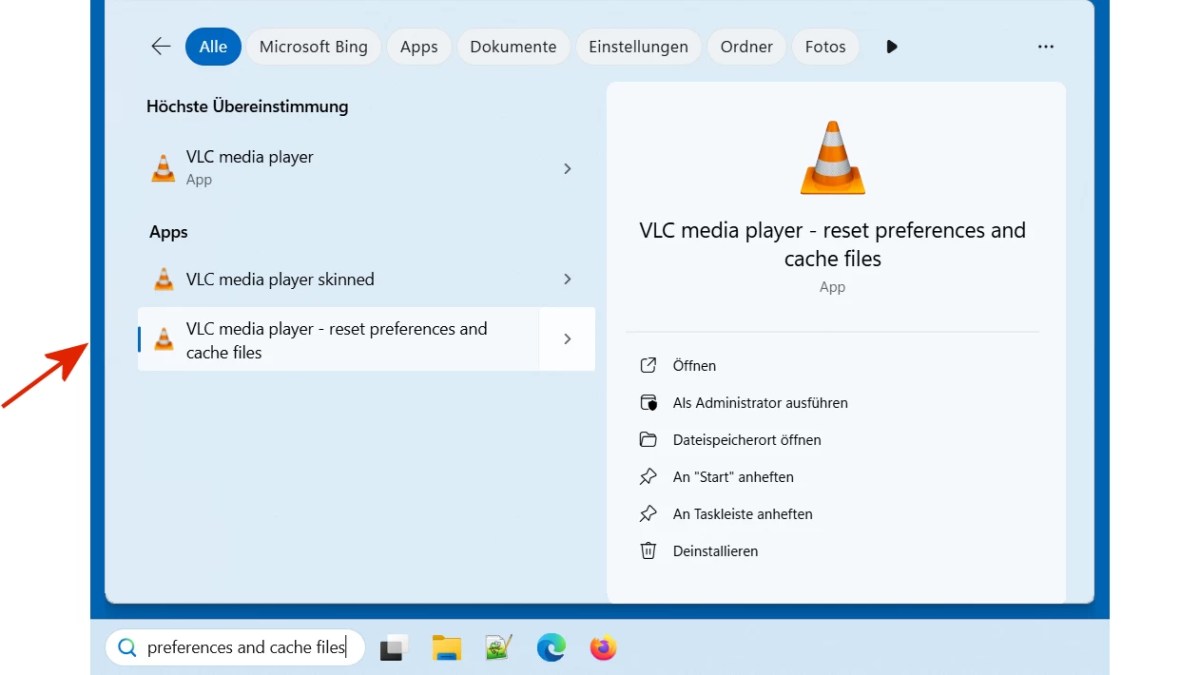
Click on the search icon (magnifying glass) in the bottom left-hand corner and type VLC in the search box. The top result should be VLC media player – reset preferences and cache files. Click on this and run it–this will reset the settings and cache.

fz
By the way, since Microsoft hasn’t released a fix for Defender yet, the problem might reoccur. To prevent this, set an exclusion in Defender for VLC Media Player. This basically tells Defender not to scan the directory for malware. This does involve a certain risk, especially if you didn’t download the VLC Media Player from the manufacturer’s website.
To set the exclusion in Microsoft Defender, go to the following in Windows 10: