My candidates included an as-yet unreviewed $1,899 updated version of the Acer Nitro V, with an AMD Ryzen AI 7 450, paired with an RTX 5060 creator-class GPU; an $3,799 MSI Raider, with an Intel Core i9-14900HX, and a last-generation RTX 4090; and a modern monster, $4,299 Asus ROG Strix gaming laptop equipped with a Core Ultra 9 275HX and an RTX 5090.
My tests included a Cinebench run to establish overall performance, then runs of Adobe Photoshop and Premiere to assess the laptops’ comparable creation chops. I made a brief segue into gaming with Cyberpunk: 2077, then dove into AI: Procyon’s text-generation benchmark measures large language-model performance. Finally, I crushed each laptop with a text-to-video application, governed by ComfyUI, with some on-device local LLM testing. Here, I didn’t fool around with battery mode; I tested with default settings but also at maximum power.
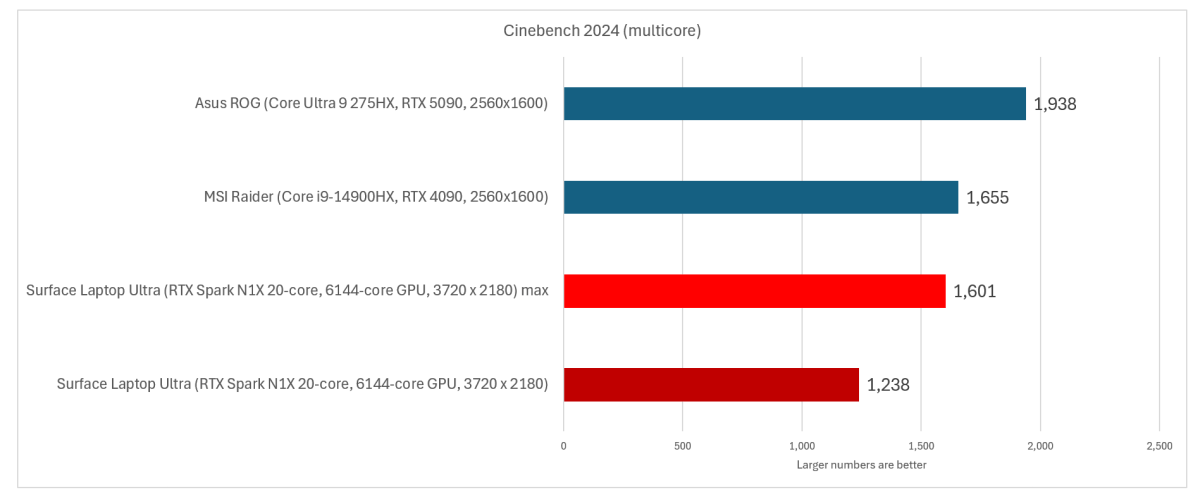
Here’s each laptop, as evaluated by Cinebench 2024 for total CPU performance. (I used the Arm version of the test for the Surface Laptop Ultra.) The Acer Nitro glitched and wouldn’t run this test. It’s impressively close.

Mark Hachman / Foundry
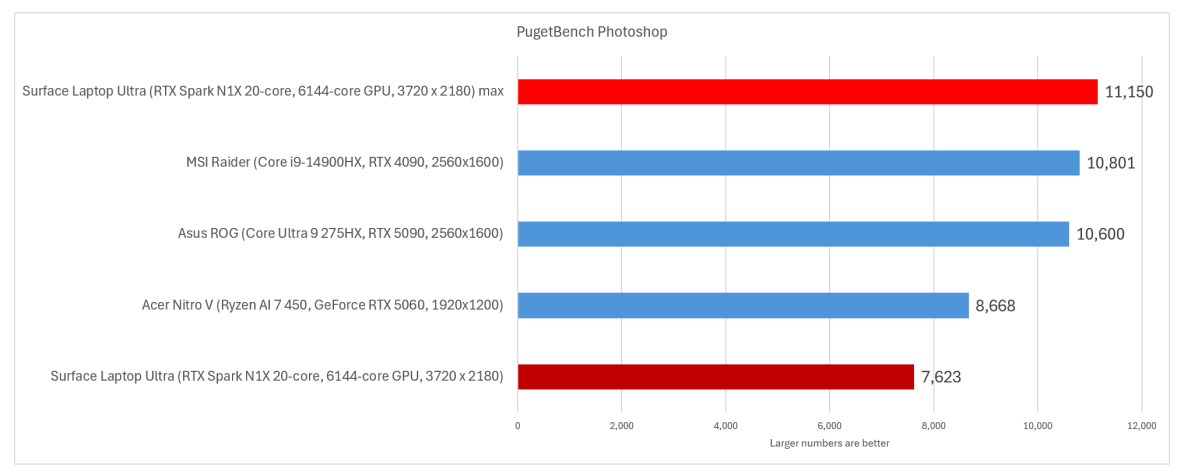
I then used PugetBench’s Photoshop and Premiere tests as a gauge to how the Surface Laptop Ultra fares as a content-creation machine. I was shocked by the first result.
At base levels, the Laptop Ultra finishes last. With performance dialed up, it’s…first? The PugetBench Photoshop test is finicky, so I only checked this result once. Still, the Photoshop test completes three runs before settling on a final score, so I suspect that it’s accurate.

Mark Hachman / Foundry
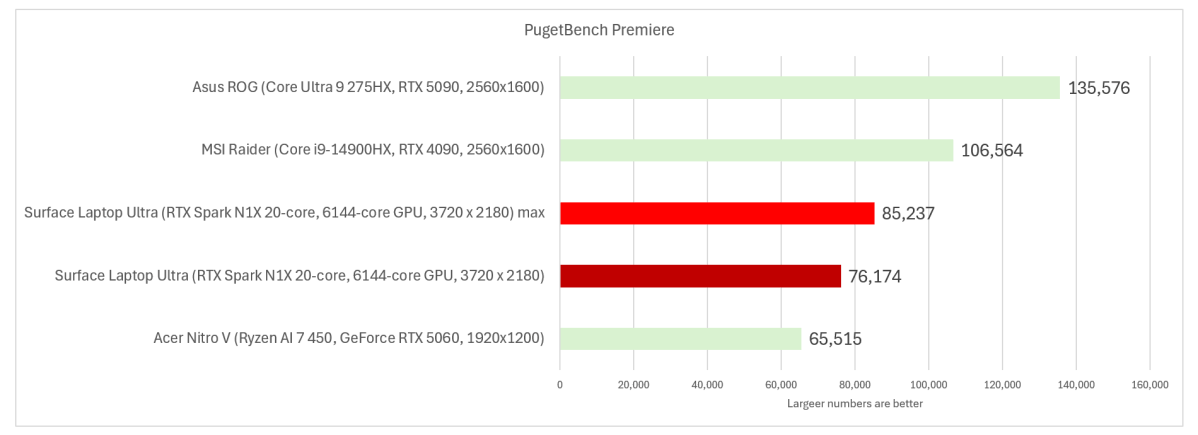
I didn’t see nearly as much improvement in the Premiere test, which exports several video files. I’m not sure why. Adobe will have new versions of its Creative Cloud applications to use with the RTX Spark platform, but Adobe hasn’t said when they’ll arrive. I used a beta version of Premiere for this test, which Adobe supplies as part of its Creative Cloud beta program.
Nevertheless: A solid showing here by Microsoft’s newest laptop.

Mark Hachman / Foundry
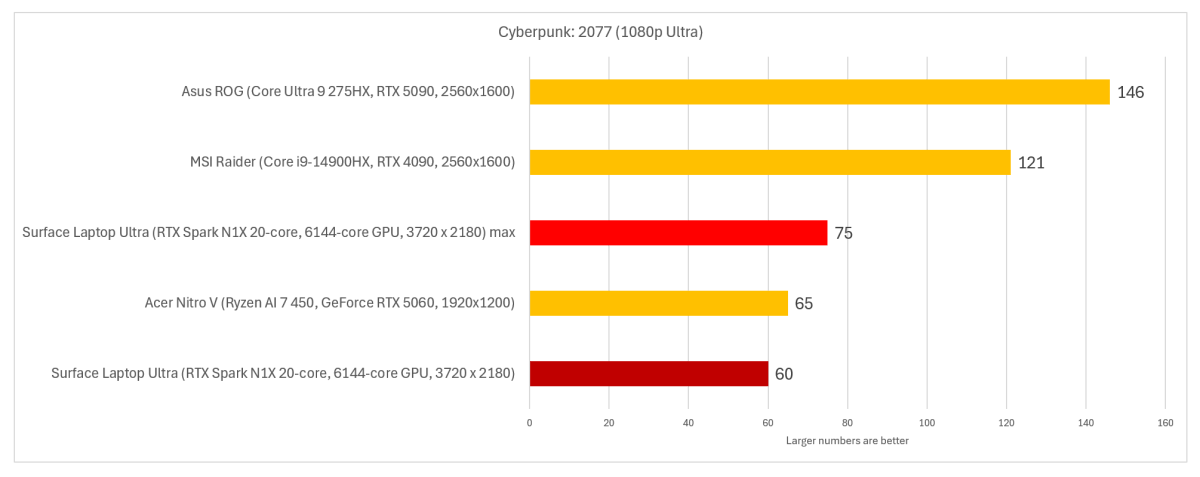
As mentioned above, my colleague Michael Crider is testing his own RTX Spark sample laptop with an eye towards gaming. Again, the RTX Spark platform is an Arm chip, which may have compatibility issues…or not. I present the Cyberpunk: 2077 test below as a representative sample, but expect more in terms of game testing soon.
I ran several tests to compare the gaming laptops to the Surface Laptop Ultra, and settled on using 1080p resolution at Ultra settings, a decent compromise between efficiency and quality. Initially, I turned off frame generation.

Mark Hachman / Foundry
But this is an AI laptop, and if there’s anything “AI”-related that Nvidia is known for, it’s DLSS AI frame generation. With those options enabled, frame rates jumped to 104 frames per second. And dialed up to maximum power with DLSS and frame generation on, the laptop ran that game at 130 frames per second — more than double the base rate.
I paused my testing for another angle: power. Even though the United States is blissfully headed into cooler temperatures, power bills keep rising. One of Arm’s arguments is power efficiency, so I hooked up a power meter to the laptops and reran the benchmark again.
Even though I didn’t measure prolonged power consumption, the differences between all four laptop platforms were immediately obvious:
- The Acer Nitro V laptop held steady at between 115 to 117 watts, touching 121W at peak.
- The MSI Raider blasted through 290 to 305 watts, hitting a peak of 335W max.
- The Asus ROG Strix fluctuated the most, consuming 261 to 290 watts and peaking at about 310 watts.
- As for the Surface Laptop Ultra? It didn’t consume the least amount of power, but 133 to 144 watts throughout the run holds its own. (I didn’t test the power output with DLSS on, which should increase efficiency.)
The point is that more power equals more performance, but more performance equals more power…and possibly a higher total cost of ownership.
Finally, I wanted to know if Microsoft expects people to work on an airplane, churning away at offline AI agents, with fans howling — and will the seat actually provide enough power? My research says no, but I can’t prove it definitively. (Microsoft said they’d get back to me.)
Table of Contents
Surface Laptop Ultra: AI tests
Microsoft and Nvidia argued that the RTX Spark platform should usher in a new era of local AI, with local LLMs and agents busily chewing up compute cycles. That’s true, to a point. The argument in favor of that now is that local AI equals free tokens — cold hard cash is now the selling point, versus the privacy-first approach from a couple of years ago.
But there are still catches. Acer shipped its new Nitro V laptop with just 512GB of SSD storage on it, and I found myself spending my own human “compute cycles” just trying to find space on it for what I wanted to run. Photoshop, Premiere, text-to-video models…it all adds up. If you don’t have at least a terabyte of storage, you’re going to feel the pinch.
And that’s before you begin trying out AI models. Local AI requires local memory to run in. Dedicated gaming laptops with discrete GPUs have their own fixed pools of video RAM, which AI can tap for executing generative AI. Agents, however, lean more heavily on the CPU. Laptops like the Surface Laptop Ultra split memory between the GPU and CPU, and my review laptop came with a small utility to let Windows handle the division of labor. (To date, users have been able to manually configure the split between VRAM and system RAM via the BIOS or an app supplied by AMD or Intel.)
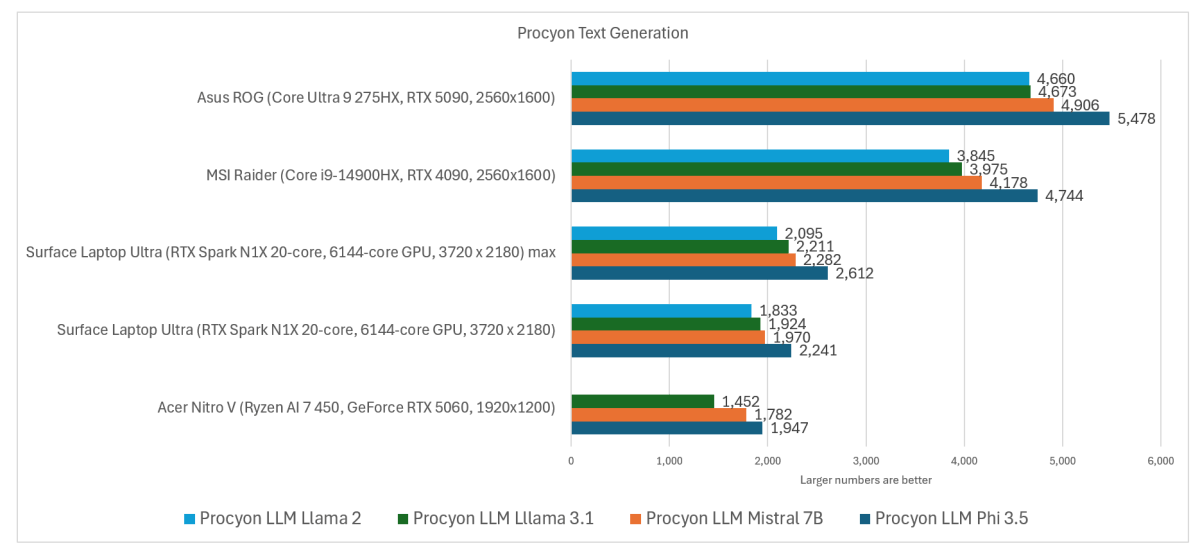
UL’s Procyon app already ships with a handy little test to measure how well the laptop will process queries using models with about 8 billion parameters. (“Better” models usually favor more parameters, though that can vary. Models can also be “compressed” via a process called quantization to run locally without taking up as many resources.)

Mark Hachman / Foundry
The performance via model varies, of course, but the overarching lesson is clear: The gaming laptops generated more tokens. (A token is a few letters, so that the word “few” might be a single token, and the word “somewhere” might be three.) An LLM spits out a response like an old dot-matrix printer, so reading that output is subjective. Using the Mistral 7B model, the Surface Laptop Ultra spat out about 52 tokens per second, about 13 words per second.
That’s not the only way tokens are processed, of course. A “token” can be part of a chart, an image, a video, or more. The most recent use of generative AI is AI-generated video, which has become rather scarily realistic. Is AI slop still AI slop when produced on your own local hardware? Regardless of how you land on the subject, text-to-video generative AI absolutely murders a laptop.
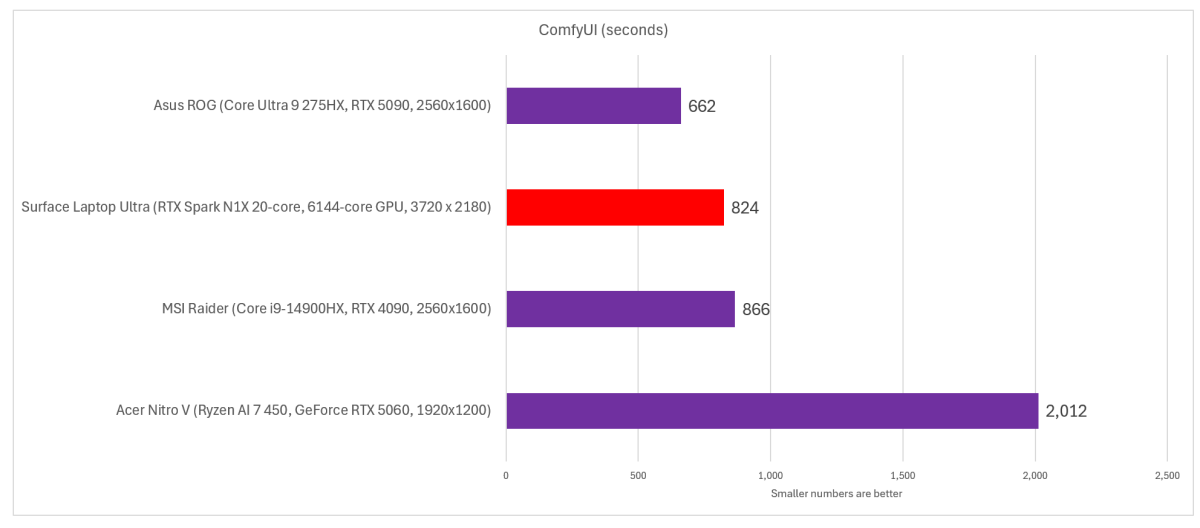
ComfyUI contains its own in-app benchmark to measure this. The Surface Laptop Ultra performs surprisingly well. (I ran it on its maximum performance settings by default.) It’s not noted in the cart below, but I used the WAN model to generate the output.
This benchmark doesn’t measure tokens, but the time to finish up a single run, supposedly generating several seconds of video. A lower score is therefore better. (ComfyUI too, now runs native on the RTX Spark platform.)

Mark Hachman / Foundry
I also tested token output via LM Studio, using the Qwen 3.8-27b model as an example. LM Studio’s settings allow you to only choose from models which will run on your PC, which meant that I was prevented from using some of the more powerful options. Would that make a difference? I honestly have no idea. Still, I could only run what I could run!
Using a consistent reasoning budget, zero temperature (for, ideally, fixed responses), and a fixed outcome length, I asked for a science-fiction essay using the same prompt for the two high-end gaming machines, plus the Surface Laptop Ultra. After a trial run, I averaged the token output over three times.
- Surface Laptop Ultra: 39.9 tokens/s
- MSI Raider: 15.2 tokens/s
- Asus ROG Strix: 61.9 tokens/s
I then ran a fourth test, working on a web browser in the background, while trying to test whether working with an LLM in the background would affect its productivity. It didn’t seem to, as I noticed no difference. I didn’t work hard in the background as I normally would, with Excel and Outlook and a web browser all competing for compute cycles. I have to believe that will affect it, but that will have to wait for further testing. Keep in mind that when you do that, you’ll be working while the laptop’s fans are cranked up high.
Nvidia debuted a new Nemotron 3.5 Bolt 74B-A9B 24GB model for RTX Spark laptops as I finished up this review, but I didn’t have a chance to try it.
Finally, I did try running NousResearch’s Hermes, one of the recommended AI agents which you can access via the Microsoft Store, on the Surface Laptop Ultra. I’m still somewhat reluctant to give it control of my PC (yet) but it did load on my PC. I found it interesting, though, that Windows assigned 18.9GB of the available memory to itself — and while it used every bit, the GPU was barely touched during the agent’s operation.
Still, I was right — memory is going to be at a premium in the AI age, and you’re going to want more, more, more.
Should you buy the Surface Laptop Ultra?
I wrestled with this, naturally. The version of the Surface Laptop Ultra we were offered for review isn’t a low-end machine, obviously. Nor is it the minimum Microsoft offers. It feels, though, that we’re exploring the “low end” of the Surface Laptop Ultra lineup for an insane $3,700. Whew.
We’re not done yet, though. PCWorld’s review strategy has been to examine the RTX Spark platform through different eyes: First mine, focused on productivity, then separate articles examining it from a gaming standpoint as well as from an AI perspective. And yes, we have a $7,000 RTX Spark laptop in house.
And I think that’s the crux of the matter. As a pure productivity machine, you can find better options — and, if you’re eager to use AI, you can turn to a cloud model. That’s sort of what executives were privately pushing at the RTX Spark launch: to run a local “harness” on 32GB laptops like the Surface Laptop Ultra, and tap the cloud instead.
And yet! This is a $3,699 PC that’s far lighter and more compact than the gaming PCs I compared it to, consumes far less power, and performs somewhat near the other, bulkier machines. You can certainly make an argument that it’s well out of reach of the ordinary consumer, yet worth it as a (sorry) “budget” AI workstation.
I still think, however, that there’s going to be FOMO if a new AI model comes out and this version of the Surface Laptop Ultra can’t run it. So be careful. That way lieth dragons.