
Pangram review: A polished AI detector that gets the basics right
Pangram in brief:
- Price: Free up to 2,000 words per day; Individual: $20/month; Professional: $65/month
- Supported languages: 24
- File uploads/formats: PDF, DOCX, and RTF; supports OCR for scanned documents
- API: Yes
- Plagiarism checker: Yes
- AI models it claims to detect: ChatGPT, Claude, Gemini, Llama, Grok, DeepSeek, Mistral, Qwen, Kimi, Gemma, Nemotron, and GLM
- Company: Pangram Labs, Inc., based in Brooklyn, New York
What features does Pangram offer?
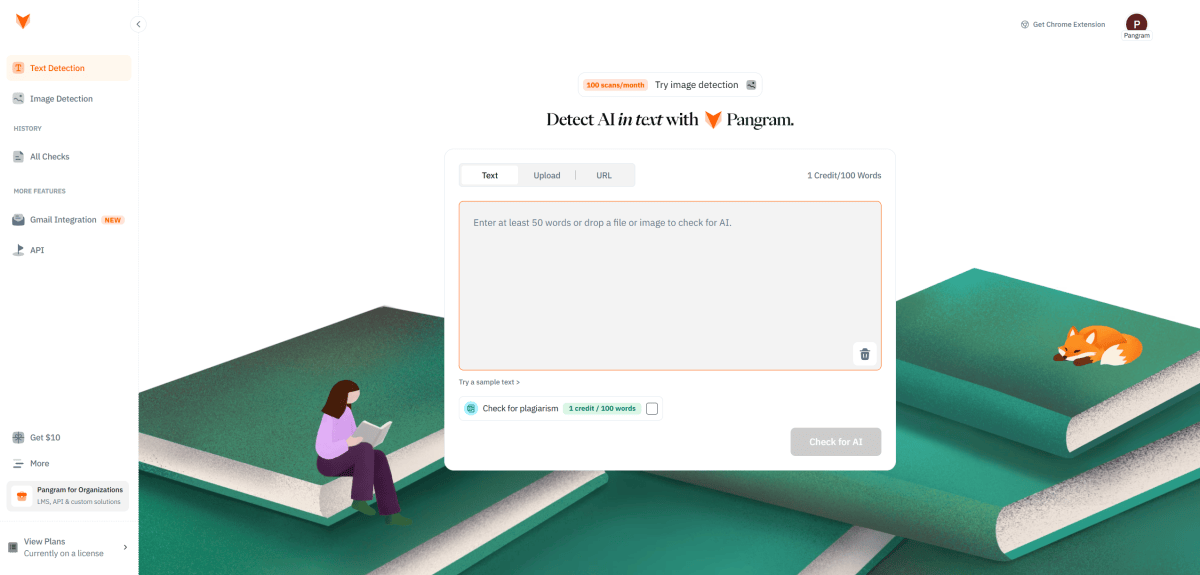
Pangram’s Dashboard is very clean and easy to use. Simply paste the text you want to check into the box in the middle and click “Check for AI.”
Sam Singleton
Pangram works differently from a lot of older AI detectors. Instead of relying heavily on perplexity—basically a measure of how predictable a piece of writing looks to an AI model—Pangram uses a classifier trained to spot patterns tied to human and AI writing. It then estimates whether the text was written by a person, generated by AI, or generated by AI with human edits.
Like most of these services, it gives you an AI detection score ranging from 0 (human written) to 100 (AI-generated). Longer documents get split into sections, and passages are highlighted based on how they’re classified. Pangram’s current model attempts to distinguish between human-written, AI-assisted, and fully AI-generated text within the same document.
Pangram’s level of detail is a big selling point. Unlike other AI-detectors that slap a single AI-or-not label on a whole document, Pangram gets into the nitty-gritty details, flagging specific sections it believes are AI-generated or not.
After analyzing a text, Pangram color-codes everything, making it easy to parse. Results are split into how much of a document or section looks like it was written by AI, and how confident it is in that call. I really like that the results are statistical rather than definitive. Instead of leading you to believe a text was definitely written by AI, Pangram’s results are meant more as guidance, encouraging you to read deeper.
The dashboard is super clean. There is a large text box in the center where you paste your text. A sidebar gives you options for Text Detection, Image Detection, History, Gmail Integration, and API. You can paste text directly into the dashboard or upload PDF, DOCX, and RTF files, including scanned documents via OCR. It supports batch uploads of up to 100 files, and it saves your past scans so you can reopen them or download reports later. There’s also an option to paste in a webpage URL and scan it directly.
