Discord may have paused its age verification rollout, but don’t take it as a privacy win. Not when the messaging platform continues to emphasize that more than “90% of users will never need to verify their age to continue using Discord exactly as they do today”—and has delayed the reveal of how exactly it makes that call based on your activity.
For now, what we know is that Discord will initially guess at your age via markers like account age, payment method on file, servers you’ve joined, and “general patterns of account activity.” That last category refers to whatever determination is made by AI trained on your usage information. That may sound innocuous to some folks, especially given Discord’s simultaneous promise not to scan your messages and other content to determine your age. But here’s the thing: You don’t know what exactly your data is saying about you, nor what it’s helping to build.
Don’t like the sound of that? You can, of course, quit the service altogether to stop the profiling. But if that’s not an option, or too drastic a step right now, you should at least reduce how much data you share with Discord. Especially if you’re already paying the company for Nitro—why pay a company that’s harvesting your data?
Table of Contents
Change these 5 Discord privacy settings
On a PC, click the gear icon for User Settings. Mobile users should first tap on the You tab at the bottom of the main screen, then on the gear icon.
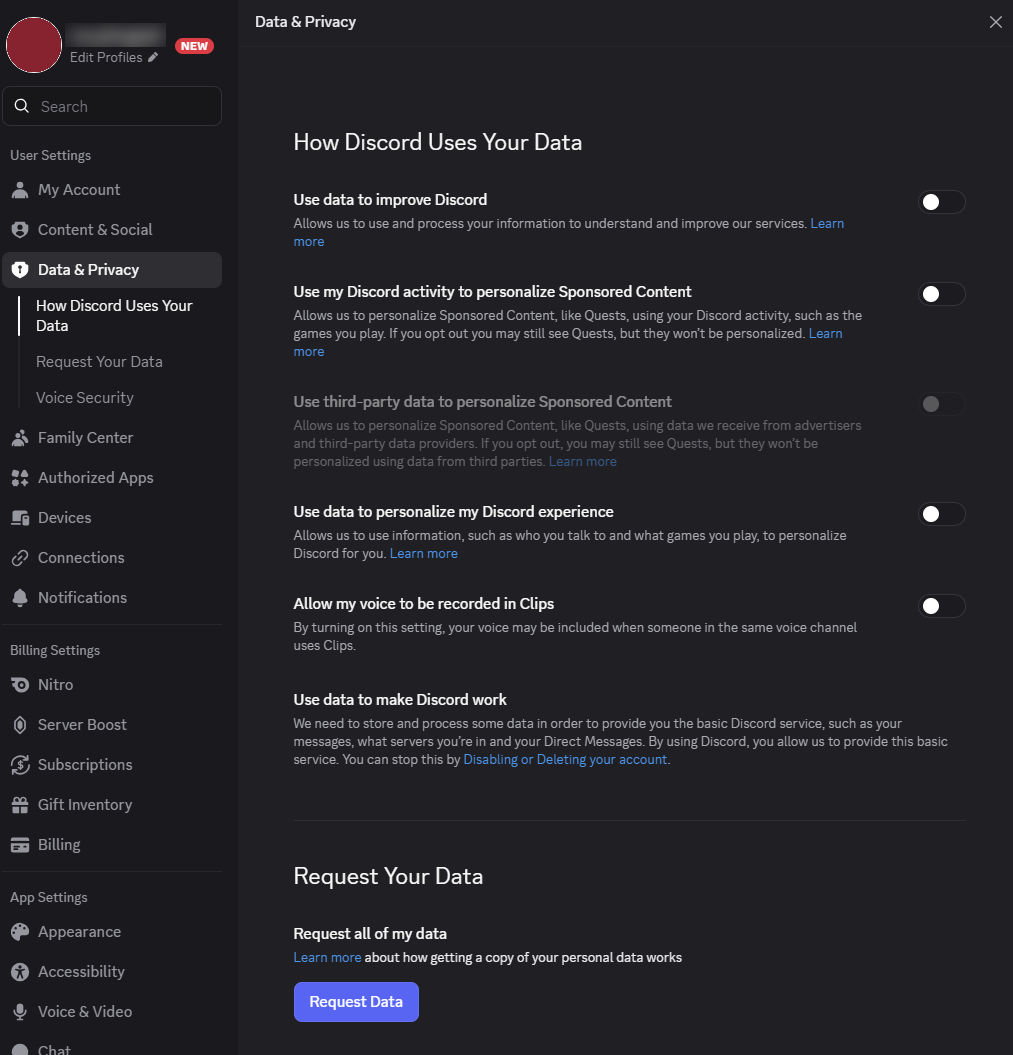
You will turn off settings under Data & Privacy on PC. On mobile, you’ll have to go into two sections, Data & Privacy and Clips.
Data & Privacy

PCWorld
Click the toggles for these settings to turn them off:
- Use my data to improve Discord
- Use my Discord activity to personalize Sponsored Content
- Use third-party data to personalize Sponsored Content
I also recommend turning off Use data to personalize my Discord experience, but this may break certain quality of life benefits, like having friends you interact with more often show higher in the “Active Now” section of your Friends List.
Clips
If you want full control over who can record your voice while in voice channels, click the toggle for this setting to turn it off:
- Allow my voice to be recorded in Clips
(And yes, “full control” means you block everyone from being able to record, unless you go back in and toggle the setting back on.)