
Would you let AI manage your inbox? I’m doing it for science
Summary created by Smart Answers AI
In summary:
- PCWorld explores the risks and benefits of using AI agents like Claude for email management, following Notion Mail’s recent shutdown that left users dependent on AI sorting.
- AI email automation offers appealing benefits including reduced inbox clutter and better organization, but poses operational risks like misfiling or accidental deletion.
- Privacy concerns remain significant as AI agents access sensitive personal and financial data, requiring users to carefully weigh convenience against potential security risks.
When I learned that Notion, the popular online workspace service, was shutting down its Notion Mail product, it wasn’t the shutdown itself that got my attention.
No, it was this: because so many Notion users had handed over their email sorting duties to AI agents, they’d stopped bothering to open their inboxes.
Letting AI agents sort through all your email has long been considered a killer app for AI, although the convenience doesn’t come without some serious risks.
First, there’s the privacy aspect. Do you really want AI agents poking through all your email messages? What if they see something personal or spot an account number? Could an agent be tricked (through prompt injection or otherwise) to leak your private data to an attacker or another third party?
Second, there’s the risk of something going haywire. What if the agents mis-file a message or (gulp) deletes your entire inbox, all because of a bad prompt? Or what if the AI sends an email to the wrong person or distribution group?
Those are all good questions, and the answers for most of them are: It depends. Different AI providers offer different guardrails for their mail-handling agents and integrations, and when it comes to do-it-yourself agentic tools like OpenClaw, anything goes.
So yes, there are plenty of reasons to feel wary if downright fearful of the prospect of letting AI agents loose on your inbox — and to be clear, this entails taking things quite a bit further than a simple, read-only AI triage.
But there are some tempting upsides too, such as getting a little help plowing through the thousands of unread “Other” messages in my Outlook inbox. It would be a major relief to get a team of agents to sort through all those emails, plucking out the handful of “real” messages and nixing the rest.
It was the thought of my ballooning Outlook inbox that persuaded me to give AI agents a crack at my email — and while I am sorely tempted to enlist their help with my work Outlook, I’m trying it first using a separate Gmail account. (Relax, boss.)
As I mentioned before, there are plenty of AI providers that offer email integrations, including Gmail. Google’s Gemini, of course, can tap into your Gmail, as can ChatGPT and Notion. I chose to give it a try with Claude, via the Cowork tab in the Claude desktop app.
Claude’s Gmail integration comes with a variety of safeguards, including the fact that it can only draft email messages but won’t send them without your OK. Likewise, Claude can put email messages in the trash (where they’ll sit for 30 days), but can’t delete them permanently. It’s also easy to block Claude from training on your data, including the Gmail it reads.
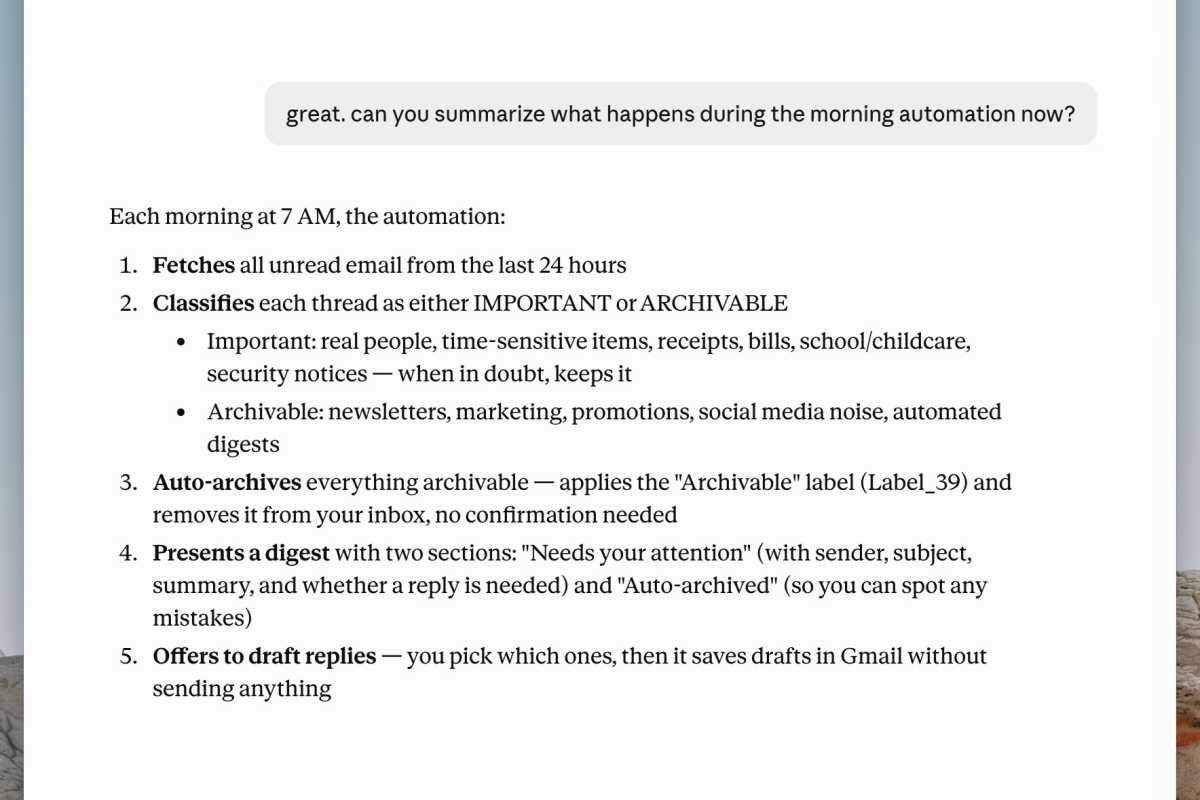
I worked with Claude to determine what it would — and wouldn’t — do with my email each morning.
Ben Patterson/Foundry
Using Claude Opus 4.8, the current most-powerful Claude model for everyday users (or at least until Fable finally returns), I created a morning Gmail automation: Check all my messages from the past 24 hours, classify each thread as “Important” or “Archiveable,” label the “Archiveable” messages and remove them from my inbox, label anything that looks like a receipt, give me a triaged summary, and then draft replies in my own voice to business or school correspondents, while leaving replies to friends and loved ones up to me.
It’s only been a day since I started my AI-in-my-Gmail experiment, but I’m already seeing results. My inbox is cut down to size, the “unread” count is much smaller, and a few stray receipts have been safely tucked into my “Receipts” folder. Claude hasn’t drafted any email messages yet, but I imagine I’ll see some in the coming week.
Am I concerned about Claude sifting through my personal messages? Sure, but not any more than I am about Google doing the same thing.
And while the risk of Claude pulling a HAL 9000 with my messages can’t be discounted, the promise of getting my inbox under control is making me willing to roll the dice.
I’ll keep you posted.
