
Lenovo ThinkPad P16v Gen 3 review: Powerful, but hard to recommend
Table of Contents
At a glance
Expert’s Rating
Pros
- Good overall performance
- Working battery life is decent
- Matte display helps visibility
- Quality keyboard and number pad
- Great mic noise suppression
Cons
- Big and bulky
- Drab, low-res display
- Big prosumer price premium
Our Verdict
The Lenovo ThinkPad P16v Gen 3 won’t be for everyone. Its performance is good, but it’s no match for Consumer-aimed models that also cost significantly less. Unless you need certain ISV certifications or the ability to withstand extreme conditions, this system probably won’t make sense next to the competition.
Price When Reviewed
This value will show the geolocated pricing text for product undefined
Best Pricing Today
Price When Reviewed
$3,997
Best Prices Today: Lenovo ThinkPad P16v Gen 3


The Lenovo ThinkPad P16v Gen 3 is a new workstation aimed at being a more affordable option among Lenovo’s wide selection. It still comes with fairly high-performance internals, though not the very highest performance, and it has the typical prosumer markups you might expect. This puts it at odds against consumer-aimed systems like the Dell Premium 16 or Lenovo Yoga Pro 9 16IAH10, which provide more hardware for the money but miss out on some professional bonafides like ISV certification.
Lenovo ThinkPad P16v Gen 3: Specs and features
- Model number: 21RS001XUS
- CPU: Intel Core Ultra 9 285H
- Memory: 32GB DDR5-6400
- Graphics/GPU: Nvidia RTX Pro 2000 8GB
- Display: 16-inch 1920×1200 IPS, Matte, 60Hz
- Storage: 1TB PCIe 5.0 SSD – Samsung MZVLC1T0HFLU-00BLL
- Webcam: 5MP + IR
- Connectivity: 2x Thunderbolt 4 / USB-C with Power Delivery and DisplayPort 2.1, 2x USB-A 5Gbps, 1x HDMI 2.1, 1x SDcard reader, 1x 3.5mm combo audio, 1x GbE
- Networking: WiFi 7, Bluetooth 5.4
- Biometrics: Windows Hello fingerprint, facial recognition
- Battery capacity: 90 watt-hours
- Dimensions: 14.23 x 9.79 x 1.04 inches
- Weight: 4.99 pounds
- MSRP: $3,997 as-tested ($2,329 base)
The Lenovo ThinkPad P16v Gen 3 is a performance workstation boasting ISV certifications and military durability standards aimed at professional users, and therefore there’s really no cheap option.
The base model has a starting price of $2,329 (though was discounted to $1,816 at the time of writing — nebulous pricing being a typical Lenovo move). The base configuration starts out with an Intel Core Ultra 7 255H, 16GB of DDR5-5600, a 512GB PCIe Gen 4 SSD, a basic display, an Nvidia RTX Pro 500 GPU, and Windows 11 Home.
Lenovo offers an Intel Core Ultra 7 265H or Intel Core Ultra 9 285H as upgrades as well as an Nvidia RTX Pro 1000 or 2000, though not all CPU and GPU combinations are possible. It also offers a brighter 100 percent sRGB display and a 3840×2400 touchscreen OLED option. While all configurations can support an IR sensor for facial recognition, the mid-tier display makes it optional rather than standard. The biggest area for customization is in storage and memory.
The system has two M.2 slots that can be fitted with PCIe Gen 4 or Gen 5 drives ranging in size from 512GB to 2TB. Memory comes in 16GB, 32GB, 48GB, or 96GB capacities.
Our test configuration has the specs listed above and tells a confusing price story. We were shared a sales link to CDW for our configuration that has the price at $3,997. But in Lenovo’s own custom configurator, which tends to fall on the more expensive side than pre-configured systems, our configuration shows a $3,874 “Est Value” price and was on sale for $3,021 at the time of writing.
The only real difference is that the CDW version uses a single 32GB CSODIMM memory stick while the Lenovo version uses two 16GB CSODIMM sticks. Regardless of that difference, while it’s very possible you’ll be able to get it for about $3,000, the only sure price is closer to $1,000 more.
The Lenovo ThinkPad P16v Gen 3 is made to be a high-performance machine, and you should expect no less from something bearing a nearly $4,000 price tag.
Lenovo ThinkPad P16v Gen 3: Design and build quality
Foundry / Mark Knapp
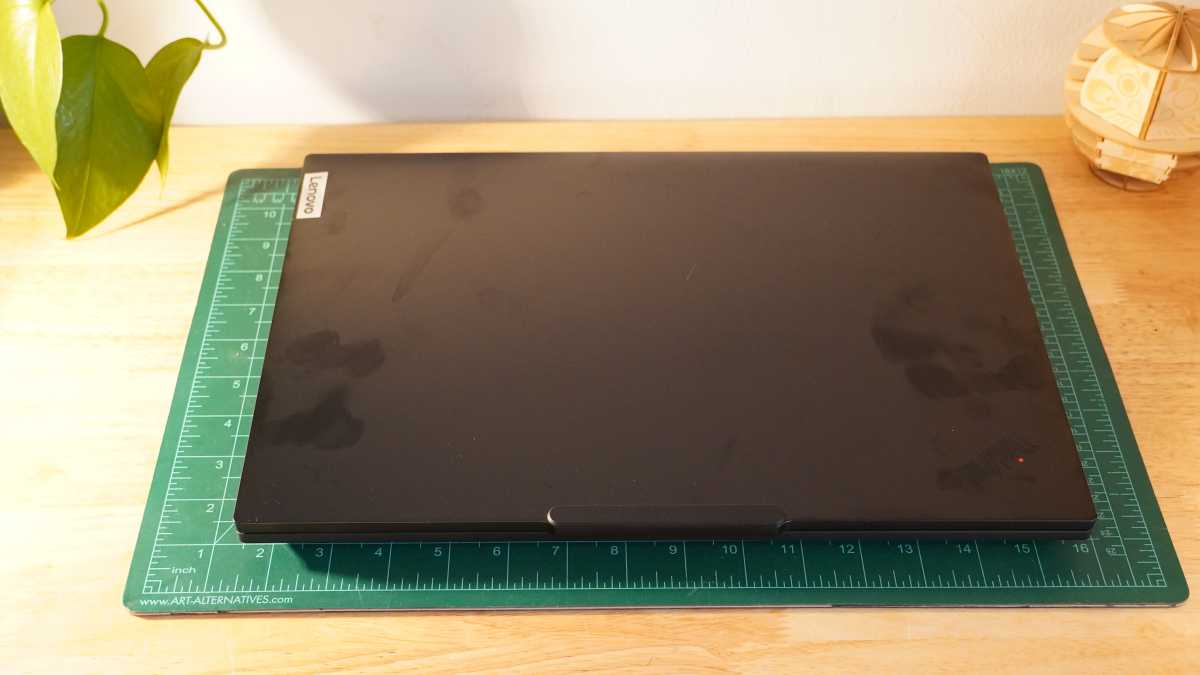
The Lenovo ThinkPad P16v Gen 3 is a bulky but otherwise quite typical ThinkPad. It has the stylings of other models with its blacked-out design, with a small lip on the display lid that assists in one-handed opening, and the keyboard and trackpad style.
While some more premium ThinkPad models have a carbon fiber-reinforced polymer that’s sturdy and lightweight, the Lenovo ThinkPad P16v Gen 3 opts for more commonplace materials. Its display lid is made with aluminum, but its bottom is a PC-ABS plastic. The keyboard deck has a nice coating that feels a bit better than PC-ABS plastic would normally. Even without the premium materials, it feels plenty sturdy and checks boxes for a few military durability tests. The display hinge wiggles for a few seconds after adjustments, though.
The Lenovo ThinkPad P16v Gen 3 is a bit bulky at 14.23 x 9.79 x 1.04 inches. Lenovo kept the bezels around the 16-inch display fairly narrow, so some of the dimensions are pretty much by necessity. But the thickness is considerable. A portion of that is coming from the rubber feet on the bottom, but it does get in the way of sliding easily into laptop bags. At just shy of 5 pounds, the Lenovo ThinkPad P16v Gen 3 is pretty hefty, too. At least its 140W charger is quite light and compact.
The underside of the laptop has two well-filtered intake grilles beneath the two system fans. Exhaust heads out the back, where the display hinge is. While some of that exhaust will head up toward the display, most should go down and behind the laptop. The wide rubber foot at the back should also avoid letting the exhaust recirculate into the laptop.
One thing the bulk of the laptop affords you is extra space inside. Instead of using the soldered-on memory many recent laptops have used, it gets CSODIMM sticks that are user-upgradeable. It also has two M.2 slots for double the storage capacity. The 90Wh battery is also a good get, though large batteries aren’t unheard of in smaller laptops.
Lenovo ThinkPad P16v Gen 3: Keyboard, trackpad
Foundry / Mark Knapp
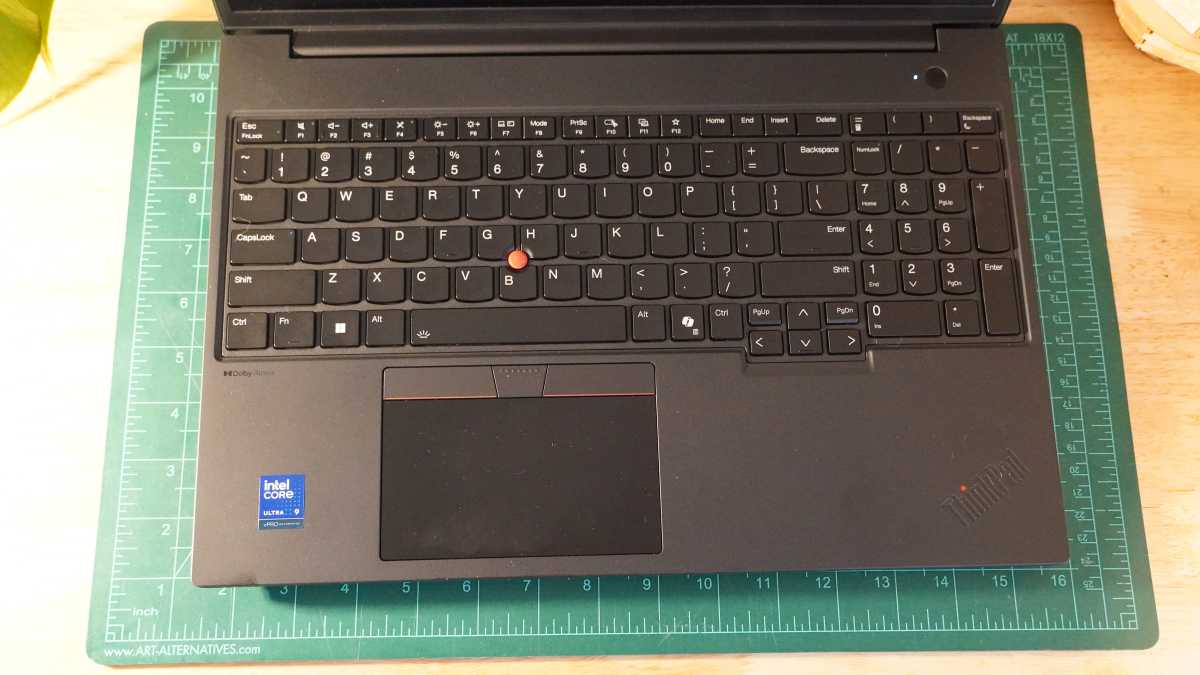
The keyboard is pleasant. It has a 1.5mm travel, and a soft but poppy feel with well-stabilized keys. This makes for a comfortable and quick typing feel. I was able to get up to a typing speed of 117 words per minute with 99 percent accuracy in Monkeytype, but it took finding a good, comfortable typing angle. The high keyboard deck can make this a little tricky, but it will largely come down to personal preference.
The use of small arrow keys crammed together with Page Up and Page Down keys is a little annoying, especially since Lenovo already offset them and might have just further offset them to allow for bigger keys. On the other hand, the large number pad is great to see and convenient for data entry, even if it’s a little narrower than full-size. For accident-prone users, the keyboard is resistant to spills, preventing small amounts of liquid from reaching key components if spilled onto the keyboard.
Lenovo’s trackpad is fine here. It’s small and almost entirely left of the system’s centerline. For left-handed users that may be more ideal, but for right-handed users, it becomes a crossbody reach that’s not super ergonomic. The size of the trackpad isn’t bad, but it feels small on such a large machine.
It’s a classic ThinkPad trackpad with three buttons at the top that work in unison with the trackpoint nib in the center of the keyboard. The nib is a decent tool for mousing around without having to move away from the keyboard, but it may take new users a little getting used to its nuance.
Lenovo ThinkPad P16v Gen 3: Display, audio
Foundry / Mark Knapp
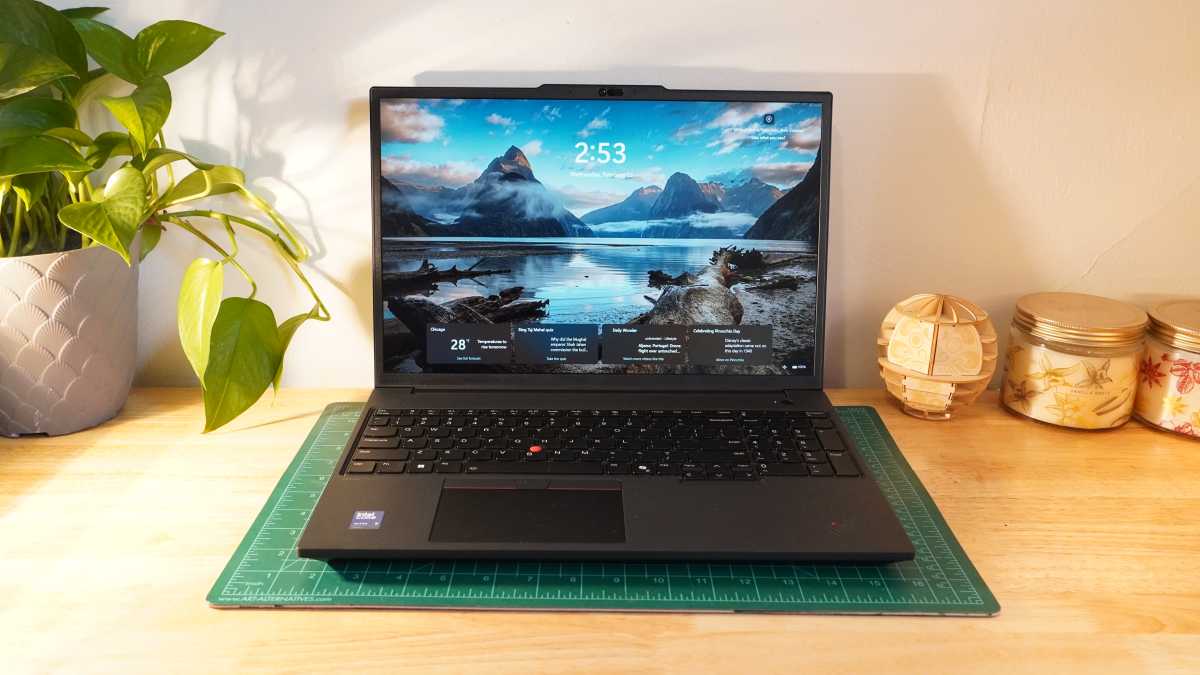
The Lenovo ThinkPad P16v Gen 3’s display is a very utilitarian one. At 1920×1200, it’s not terribly sharp, but it’s workable. It doesn’t bring any nice extras like a fast refresh rate for smoother visuals. And it doesn’t even offer full coverage of the sRGB color space, instead sitting at just 67 percent coverage. If your work involves specific colors or even if you just want YouTube videos to look decent, this simply won’t do. What the display does deliver is a solid 459-nit brightness alongside a matte finish that helps ensure clear visibility even in subpar lighting.
The speakers on the Lenovo ThinkPad P16v Gen 3 are a little bit surprising. The side positioning of them paired with Dolby’s processing gives them a surprisingly wide soundstage that makes stereo effects more pronounced. That’s good news for music, which also enjoys a decent clarity that avoids sounding boxed in. There’s not a lot of bass depth, which makes for a mid-heavy presentation that can get tiring and can take the meat out of a lot of music. But for speech, the speakers work quite well. They put out plenty of volume as well.
Lenovo ThinkPad P16v Gen 3: Webcam, microphone, biometrics
The Lenovo ThinkPad P16v Gen 3 has a decent webcam and microphone pairing. The webcam captures video with good clarity, particularly for a small laptop webcam, and natural exposure. It still exhibits some grain and softness, but it’s far from looking bad. It has a wide viewing angle that can readily get a second person into the shot, too.
The microphones combine with Dolby Voice processing that runs automatically, and it works impressively well. While speaking and snapping my fingers and clapping my hands, the mics picked up my voice quite well without too much room echo and almost completely eliminated all of the extra noise I was making. The mics don’t pick up my voice quite as fully as a standalone mic might, but they get great clarity for what they are.
The laptop also includes facial recognition and fingerprint scanning for quick logins. Both worked consistently after training, though I tend to find fingerprint scanners like this struggle after some time due to wear on the skin of the fingertips.
Lenovo ThinkPad P16v Gen 3: Connectivity
Foundry / Mark Knapp
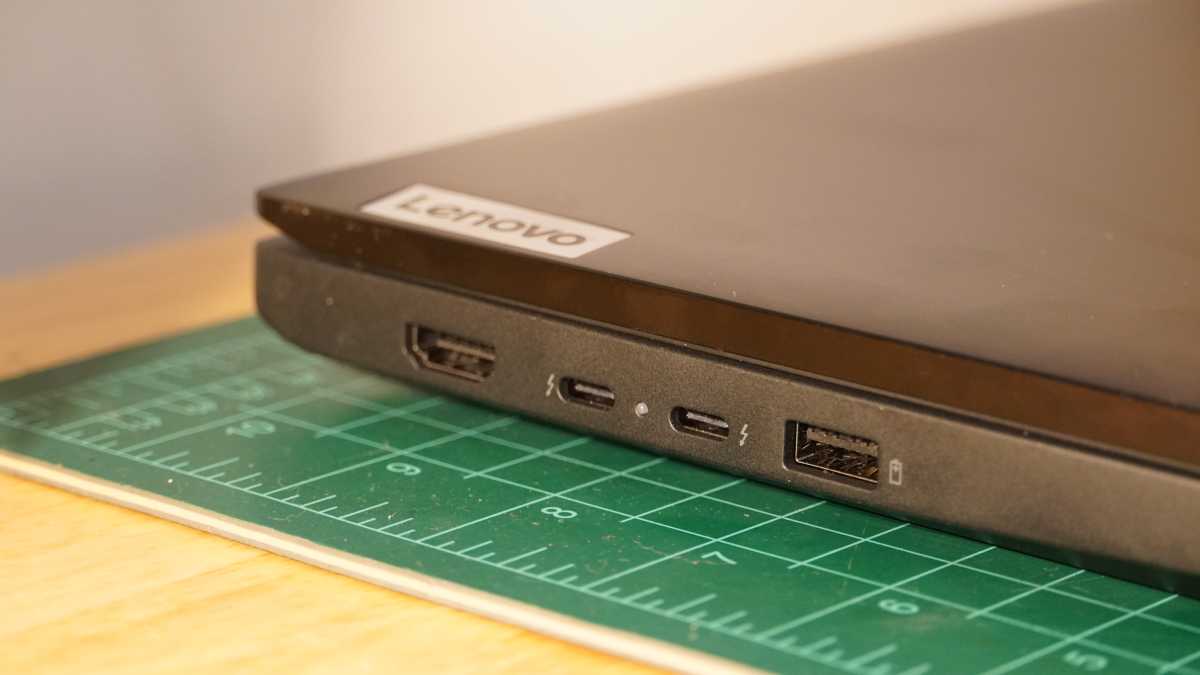
The Lenovo ThinkPad P16v Gen 3 benefits from solid connectivity. There’s room for improvement, but it’s not disappointing. Much of its wired connectivity is handled by two Thunderbolt 4 ports, which can handle hub connection, high-speed data, DisplayPort output, and charging input. Those are situated on the left side along with an HDMI 2.1 port and a USB-A port. The right side includes a second USB-A port, but both top out at 5Gbps instead of the 10Gbps they could have offered. The right side further includes an Ethernet port, a headset jack, and a full-size SD card slot.
Wireless connectivity is also a strong point thanks to Wi-Fi 7 support. It has proven fast and stable in testing. Bluetooth 5.4 is a small letdown as Bluetooth 6.0 is available now, but it’s not the end of the world. It worked reliably and supported LE Audio, which provides respectable audio quality over Bluetooth.
Lenovo ThinkPad P16v Gen 3: Performance
The Lenovo ThinkPad P16v Gen 3 is made to be a high-performance machine, and you should expect no less from something bearing a nearly $4,000 price tag. One area it surprisingly falls short is in storage speed. It offers the fast read and write speeds of a PCIe 4.0 x4 SSD (measured in CrystalDiskMark 8.0.4 at 7117MB/s and 6717MB/s, respectively), but it’s meant to include a PCIe 5.0 x4 SSD, which should have double the bandwidth.
In the holistic PCMark 10 benchmark, it shows very respectable overall performance. Against other similarly equipped hardware, it manages to pull off a modest lead even. That comes largely down to a lead it held in the productivity portion of the test, which covers spreadsheet and writing work. With that in mind, though its overall score is ahead, it won’t prove advantageous if those aren’t key parts of your workload. In any case, these are all very capable machines for general office tasks and even light digital content creation.
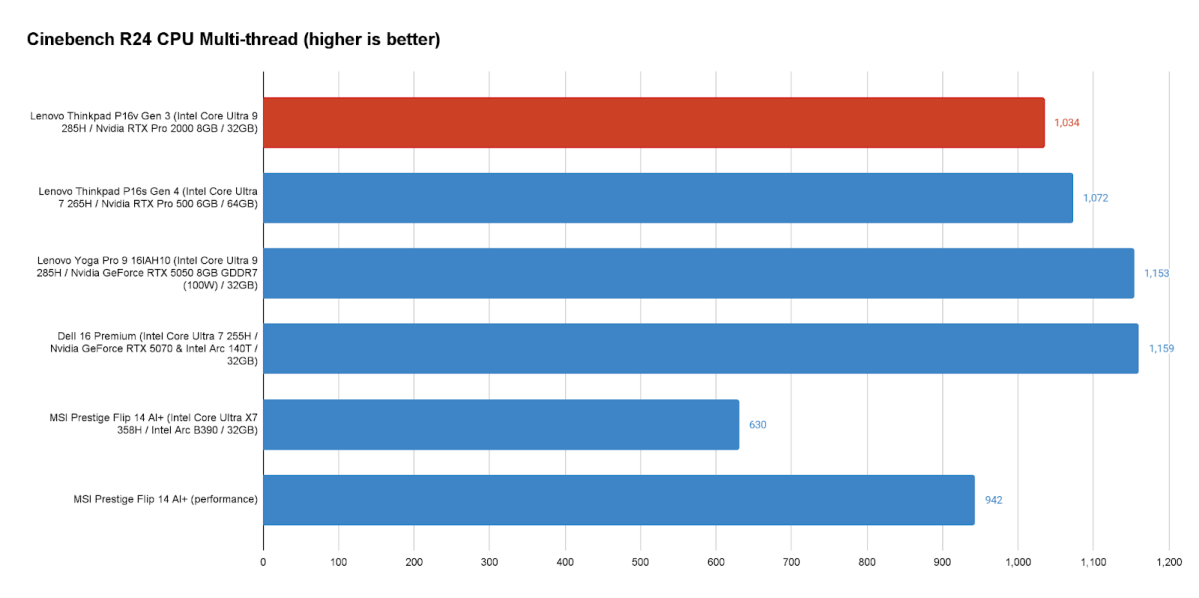
When focusing in on the raw performance of its parts, the Lenovo ThinkPad P16v Gen 3 starts to come under more pressure. Across Cinebench CPU benchmarking, the Lenovo ThinkPad P16v Gen 3 offers strong performance but isn’t far and away the leader by any means.
It consistently lags behind the Lenovo Yoga Pro 9 16IAH10 (which has the same CPU) and Dell 16 Premium (which has a lower-tier CPU) in multicore performance, though single-core performance tends to line up closer. It even fails to get out very far ahead of the Lenovo ThinkPad P16s Gen 4, which is a very similar laptop running a lower-tier processor.
It does show some promise against incoming hardware with Panther Lake CPUs as the MSI Prestige Flip 14 AI+ couldn’t quite keep up even when set to Performance Mode in Windows’ settings. MSI’s is a thin and light machine though, so we’ll still have to see how Intel’s new Panther Lake hardware fares in a larger chassis with more cooling.
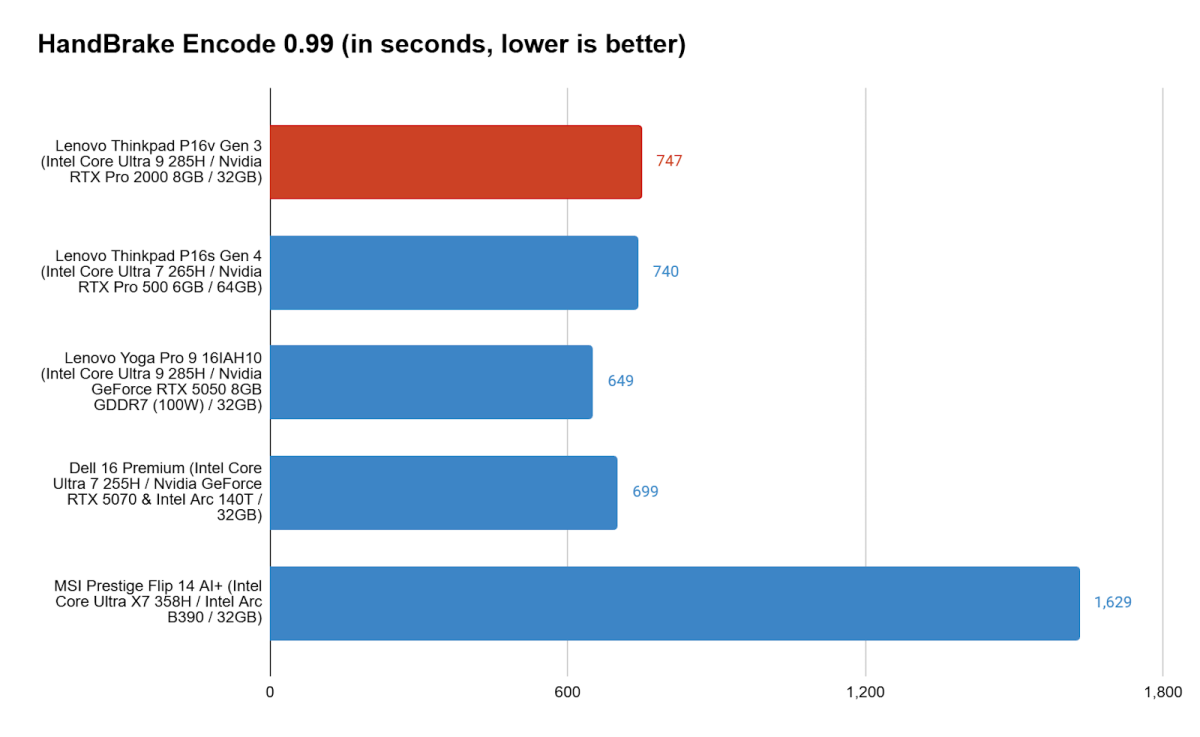
Our Handbrake video encoding test hints at the reason the Lenovo ThinkPad P16v Gen 3 couldn’t quite stack up against the competition even with its high-end CPU. As with Cinebench R24, our Handbrake encode test gives the system a heavy, sustained load. That will see it build up heat, and if it can’t properly manage the heat, it will slow down and lead to a longer runtime for the test.
And here we see that the extra speed of the Intel Core Ultra 9 285H is just not available for the long-haul on the Lenovo ThinkPad P16v Gen 3, letting it fall behind its competition, including the ThinkPad P16s Gen 4 if only by a few seconds. Lenovo’s cooling plan seems to remain a little tame, balancing actual cooling with noise levels. Under load, the fans don’t get terribly loud.
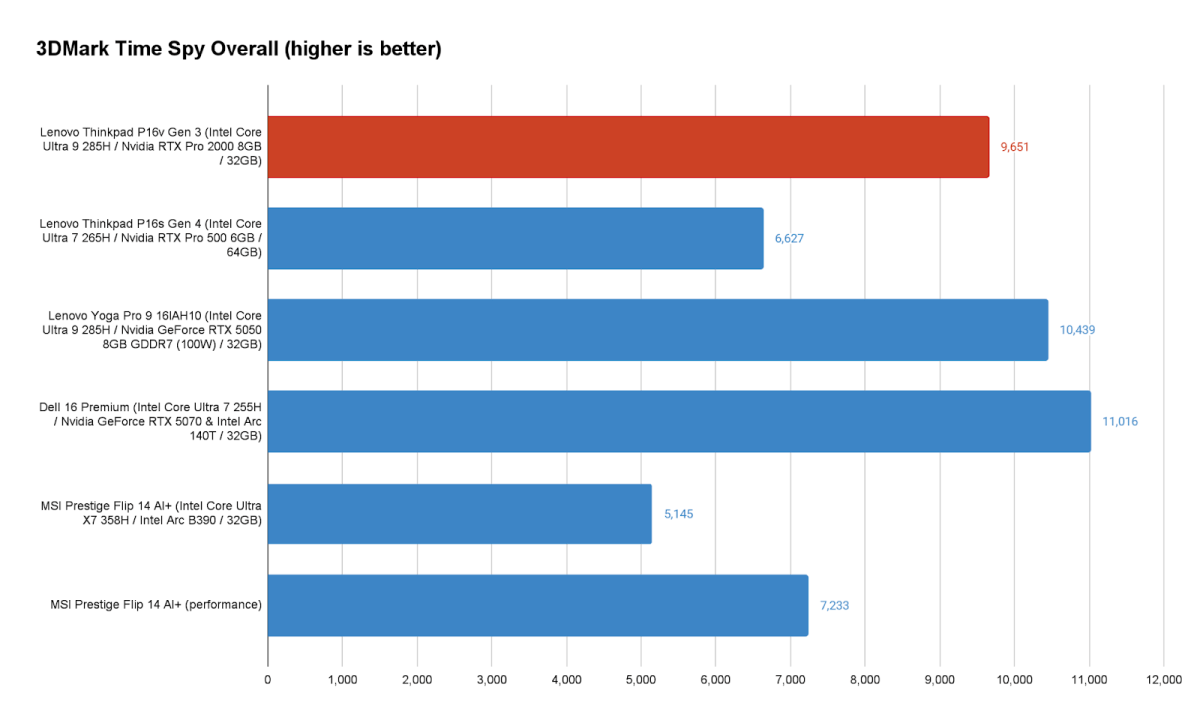
The inclusion of discrete graphics helps the Lenovo ThinkPad P16v Gen 3, but still doesn’t push it ahead. Its RTX Pro 2000 GPU doesn’t stack up against even the consumer RTX 5050 in the Yoga Pro 9 16IAH10, which overtook it in 3DMark’s Time Spy and Night Raid tests, including in the GPU-specific subtests.
It is an advantage over the RTX Pro 500 in the ThinkPad P16s Gen 4, which struggled to even come ahead of the new Intel Arc B390 integrated graphics in the MSI Prestige when that system was switched to its Performance mode. And it’s not as though the RTX Pro 2000 is just better suited to productivity graphics tasks, as the Yoga and Dell 16 Premium both came out ahead in PCMark 10’s Digital Content Creation subtests for photo editing, video editing, and rendering and visualization.
Lenovo ThinkPad P16v Gen 3: Battery life
Where the Lenovo ThinkPad P16v Gen 3 managed to actually impress was in its battery life. Even with discrete graphics, it proved capable of a solid runtime of over 12 hours in our offline video playback test. It had a decent advantage over the ThinkPad P14s Gen 4 thanks to its lower resolution IPS display. That said, Lenovo’s Yoga system and the Dell 16 Premium managed an even better showing with the former closer to 14 hours and the latter just over that line. Of course, it’s worth highlighting the huge leap Panther Lake chips can enable as seen from the MSI Prestige Flip 14 AI+’s staggering runtime over 34 hours in this test.
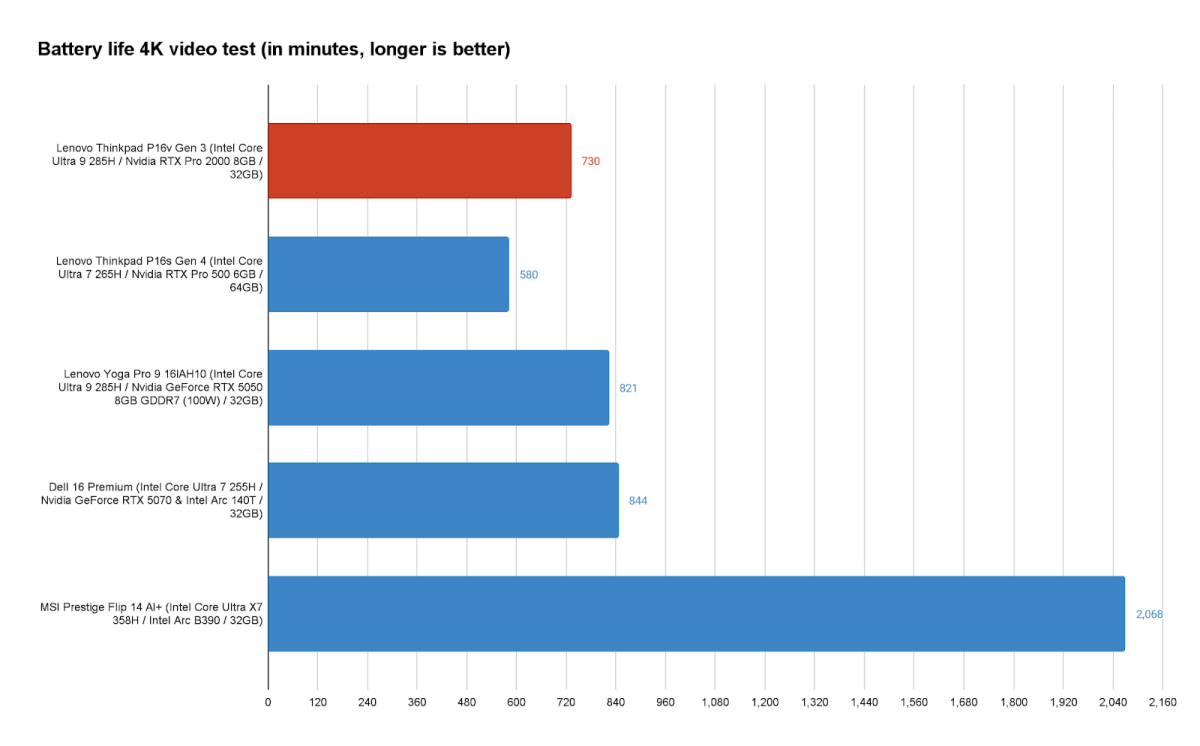
Offline video playback isn’t the most critical consideration for a workstation like this, though. It’s the actual use that perhaps matters most, and that’s where the Lenovo ThinkPad P16v Gen 3 shines.
In regular use with some breaks and a mix of higher and lower brightness settings, the Lenovo ThinkPad P16v Gen 3 has solid battery life. It had only drained by 50 percent after almost six hours of runtime. This included writing, browsing the web, watching videos, playing music, and some time with the laptop just sitting idle.
Most of that time was with the laptop at 250 nits of brightness, too, which was brighter than necessary on account of the matte display. Seeing the system on track to run nearly as long while working as it did in offline video playback is fairly impressive, even if it’s not exactly running all week.
Lenovo ThinkPad P16v Gen 3: Conclusion
The Lenovo ThinkPad P16v Gen 3 has some good aspects and some so-so. It’s not offering a stunning design or best-in-class performance, nor does it bring a great display. Its ability to conserve power in active use is a bright spot, though it’s still not breaking any records. Considering the roughly $4,000 price tag, it’s a steep option for most folks.
Unless ISV certifications are absolutely critical, most people will find a far more fitting and capable machine for less. For instance, the Lenovo Yoga Pro 9 16IAH10 is half the price, lighter, has an elegant display, and performs better at just about every turn. And new Panther Lake systems are looking very promising where graphical and AI workloads aren’t quite as important.
